

Your phone probably shipped with a music player you’ve never opened. And the Play Store is still full of “MP3 player” apps that are 90% ads and 10% player. Somewhere between those two extremes sit a handful of genuinely good music players on Google Play that are free (or close to it), still updated in 2026, and actually pleasant to use. This roundup covers those.
The quick answer: For most people with a local music library, Oto Music is the best free pick in 2026. It’s fast, clean, has no ads, and handles FLAC without fuss. If you juggle audiobooks and podcasts alongside music, get Musicolet; its multi-queue system is unmatched and it’s completely free. Audiophiles who don’t mind paying once should still buy Poweramp. A decade and a half in, its EQ and output options remain the gold standard. AIMP suits desktop refugees who want folder-based playback, and Samsung Music is worth keeping if you’re on a Galaxy. For streaming, YouTube Music is the default free option, ads and all. Every app here is a legitimate Play Store release: no shady APKs, no “premium unlocked” nonsense.
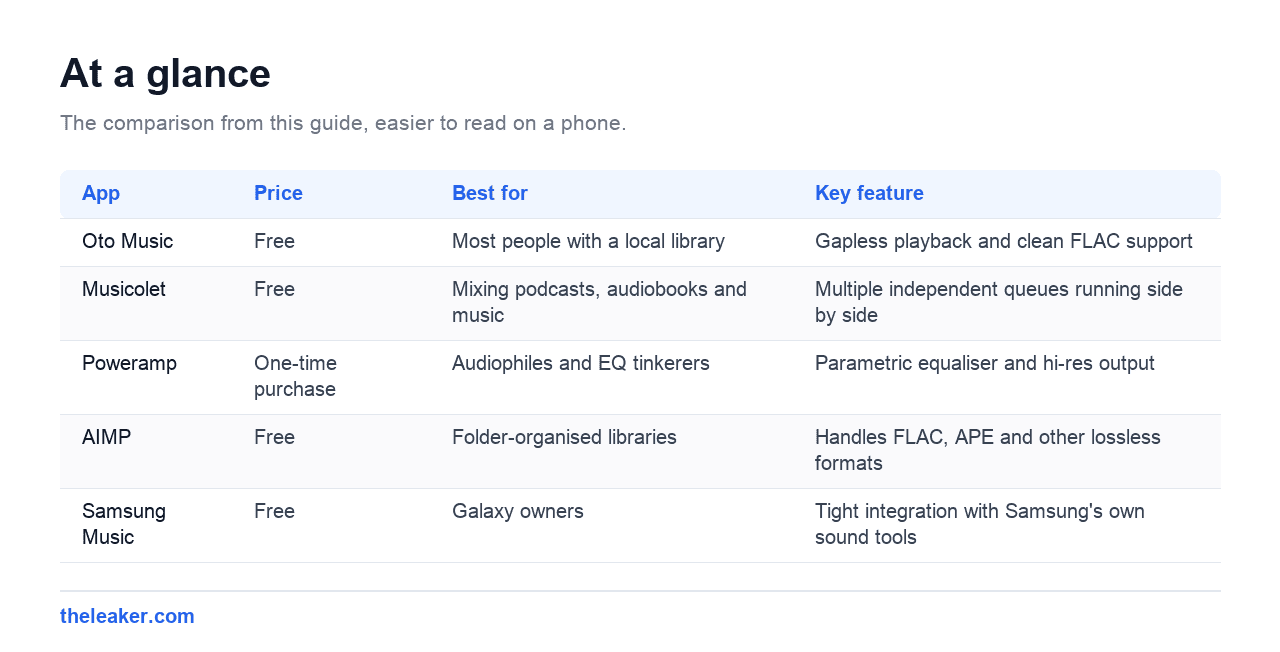
| App | Price | Best for | Key feature |
|---|---|---|---|
| Oto Music | Free | Most people with a local library | Gapless playback and clean FLAC support |
| Musicolet | Free | Mixing podcasts, audiobooks and music | Multiple independent queues running side by side |
| Poweramp | One-time purchase | Audiophiles and EQ tinkerers | Parametric equaliser and hi-res output |
| AIMP | Free | Folder-organised libraries | Handles FLAC, APE and other lossless formats |
| Samsung Music | Free | Galaxy owners | Tight integration with Samsung’s own sound tools |
Why third-party music players still matter in 2026
Streaming won, mostly. But local playback never died. It just got more deliberate. People who buy music on Bandcamp, rip their CD collections to FLAC, or keep a phone full of DJ sets and mixtapes still need a proper player. Stock players from phone makers are usually fine for casual listening but fall apart when you want gapless playback, a real equalizer, folder browsing, or proper tag handling for a 10,000-track library.
The other reason: ownership. A local library doesn’t disappear when a licensing deal expires, and it plays on a flight without a premium subscription. If you’ve got the files, you deserve a player that respects them.
Oto Music: best free player for most people
Oto Music is the answer to “just give me a good player without ads.” It’s lightweight, loads big libraries quickly, and the interface stays out of your way. You get gapless playback, synced lyrics support, Chromecast, folder browsing, and clean Android Auto integration: all free, with a cheap one-time pro upgrade that’s more of a tip jar than a paywall.
Who it suits: anyone who wants a modern, minimal player that handles FLAC and large libraries without asking anything in return. If you only install one app from this list, make it this one.
Musicolet: best for podcasts, audiobooks, and queue nerds
Musicolet’s party trick is multiple queues. You can keep a music queue, an audiobook queue, and a podcast-episode queue running side by side, each remembering its own position. No other mainstream player does this as well. It’s also completely offline, no internet permission at all, with zero ads, an 8-band EQ per-song, embedded lyrics support, and a tag editor built in.
Who it suits: people who mix long-form audio with music, and privacy-minded listeners who like that the app literally cannot phone home. The interface is more functional than beautiful, but you stop noticing within a day.
Poweramp: the paid icon that’s still worth it
Poweramp isn’t free, it’s a one-time purchase after a full-featured trial, but no Android music player list is honest without it. Its audio engine remains the benchmark: a proper parametric equalizer, per-output settings for headphones versus Bluetooth versus speaker, hi-res output support on capable devices, and playback of essentially every format you can throw at it, FLAC and beyond.
Who it suits: offline FLAC collectors and EQ tinkerers who treat their library as a hobby, not a utility. Buy it once from the Play Store and it’s yours. Never sideload a “cracked” version: modified builds are a malware vector and the developer has earned the money anyway.
AIMP: best for folder-based libraries
AIMP started life as a beloved Windows player, and the Android version keeps that spirit: it treats your file system as the library. If your music lives in carefully organised folders rather than pristine tags, AIMP plays it exactly as you arranged it. It’s free, ad-free, handles FLAC, APE, and other lossless formats, and includes a solid equalizer and playback speed controls.
Who it suits: desktop-era listeners with folder-first habits, and anyone with a messy, half-tagged collection that other players scramble into “Unknown Artist” purgatory.
Samsung Music: the stock app worth keeping
If you’re on a Galaxy phone, don’t dismiss the in-house option. Samsung Music is competent: clean design, folder support, FLAC playback, and tight integration with Samsung’s own sound tweaks like Adapt Sound and the system EQ. It’s free with no ads because it’s part of the ecosystem, not a business model.
Who it suits: Galaxy owners with straightforward needs who’d rather not install anything extra. Its one real limitation is that it’s Samsung-only, and power users will still outgrow it.
YouTube Music: the streaming context
This list is about local playback, but most people’s listening is a hybrid, so here’s the honest streaming note. YouTube Music’s free tier is the most usable no-cost streaming option on Android: full catalog, playlists, and, unusually, it can also index and play the local files on your device, making it a passable all-in-one. The free tier makes you sit through ads and locks background play behind Premium in most regions, which is the trade-off.
Who it suits: casual listeners who want everything in one app and don’t mind ads. If you’re serious about a local library, pair it with Oto or Musicolet instead of forcing it to do both jobs.
How to choose the right player
Don’t install five players and dither. Answer three questions:
- Where’s your music? All local files: Oto Music or AIMP. Mixed local and streaming: YouTube Music plus one local player. Mostly long-form audio: Musicolet.
- How much do you care about sound tuning? If words like “parametric EQ” and “preamp” mean something to you, pay for Poweramp. If you just want music to play, any free pick here is fine.
- Tags or folders? Well-tagged libraries shine in Oto Music. Folder-organised chaos belongs in AIMP or Musicolet, both of which browse the file system natively.
One rule regardless of choice: get your player from the Play Store. “Pro unlocked” APKs from random sites are the single most common way music apps end up bundling malware.
Frequently asked questions
What’s the best free music player for FLAC on Android?
Oto Music and Musicolet both play FLAC flawlessly and cost nothing. AIMP adds support for more exotic lossless formats like APE. If you want bit-perfect hi-res output to a USB DAC, that’s where Poweramp’s paid engine justifies itself: free players generally route through Android’s standard audio path.
Which players are free without ads?
Musicolet, Oto Music, AIMP, and Samsung Music are all ad-free at zero cost. That’s rarer than it sounds: most free “MP3 player” apps on the Play Store are ad delivery vehicles. If a music player interrupts you with a full-screen ad, uninstall it; you have four better options above.
Do any of these support hi-res audio and a proper equalizer?
Poweramp is the clear leader: hi-res output on supported devices, a graphic-plus-parametric EQ, and per-device output profiles. Among free options, Musicolet’s 8-band EQ with per-song settings is the most flexible, and Oto Music covers the basics well. Your phone’s DAC and headphones matter more than the app once you’re past a certain point, though.
Is it safe to download modded or “premium unlocked” music player APKs?
No, and don’t. Modified APKs are repackaged by unknown parties and are a well-documented malware channel, and a music player has access to your storage. Every app in this list is either fully free or cheap enough that piracy makes no sense. Stick to the official Play Store listings.
Bottom line: install Oto Music today, add Musicolet if you live in queues, and buy Poweramp when the tinkering itch strikes. Your library deserves better than the stock app, and in 2026, better is still free.

Hello, folks, my name is Akshay, and from the beginning, I like to play with the latest phones, gaming consoles, PCs, Laptops’s and whatnot. When I get spare time, I like to do Photography, and you will always find me playing with Photoshop, Lightroom, Premiere Pro, etc. In Love with Gadgets, my gear Motorola Moto G5 Plus. You can contact him on akshaydua[@]theleaker.com.