
Phone spec sheets have turned RAM and storage into a bragging contest. Bigger number, better phone. That’s the pitch, and it’s how manufacturers make hundreds of dollars on parts that cost them a fraction of that.
The truth is less flattering to the marketing. If you’re wondering how much RAM and storage you actually need in a phone, one of these two numbers is worth paying extra for. The other usually isn’t.
The quick answer: Storage is the one to spend on; RAM is the one people overbuy. Storage is a hard ceiling: when it’s full, it’s full, and on nearly every modern phone you can’t add more later. RAM affects how many apps stay alive in the background, but past a comfortable middle amount the returns fall off a cliff, because Android is designed to aggressively manage memory and the extra gigabytes mostly sit idle. If you’re choosing between more RAM and more storage at the same price, take the storage almost every time. And before you upgrade tiers, check what’s actually eating your current phone’s space: for most people it’s photos, video and a handful of bloated apps, and a couple of settings changes buy back more room than a paid upgrade would.
Storage: the number that will actually bite you
| Spec | What it affects | Can you add more later? | Worth paying extra? |
|---|---|---|---|
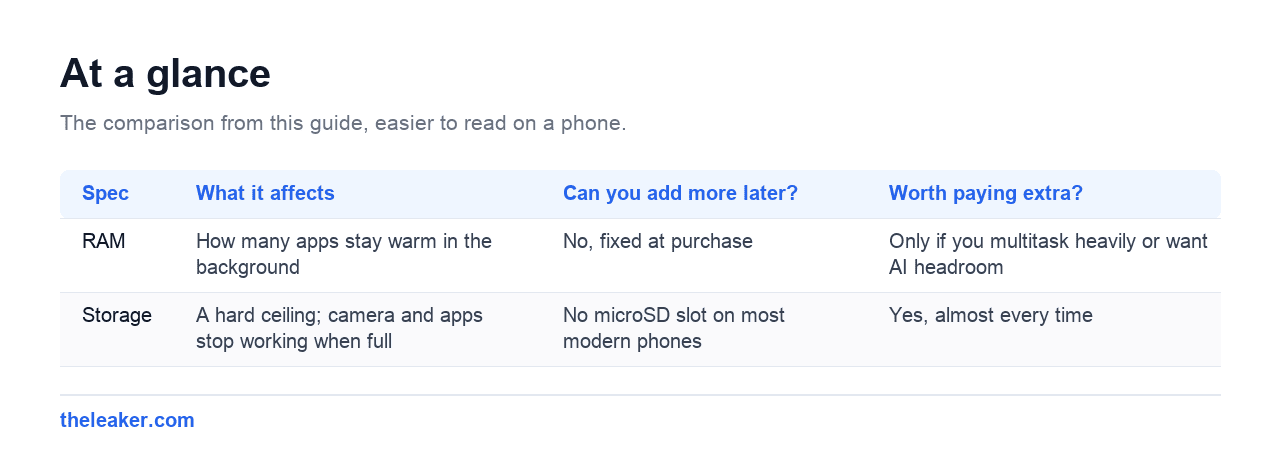
| RAM | How many apps stay warm in the background | No, fixed at purchase | Only if you multitask heavily or want AI headroom |
| Storage | A hard ceiling; camera and apps stop working when full | No microSD slot on most modern phones | Yes, almost every time |
Running out of storage isn’t a mild inconvenience. A nearly-full phone gets genuinely worse: the camera refuses to record, updates fail to install, apps crash on save, and the whole system slows down because flash storage performs badly when there’s no free space to work with.
And unlike almost every other limitation, you can’t fix it later. Most phones sold today have no microSD slot. What you buy is what you have for the life of the device.
How to work out what you actually need
Forget generic advice. Go look at your current phone right now: Settings, then Storage. It’ll show you how much you’re using and roughly what’s using it.
Then apply this rule: whatever you’re using now, plan for meaningfully more. Not because you’re wasteful, but because app sizes and photo file sizes have grown steadily for a decade and there’s no sign of that reversing. Higher-resolution sensors mean bigger photos. Games keep getting larger. A phone you’ll keep for three or four years needs headroom for three or four years of that drift.
And note that the advertised capacity is never what you get. The operating system, the manufacturer’s software layer and preinstalled apps take a real bite before you install anything: on some phones that’s a substantial chunk of the smallest tier. The base configuration is always tighter in practice than it looks on the box.
Who needs what
Light use: messaging, a browser, social apps, casual photos, streaming rather than downloading music and video. The base tier on most phones is survivable, but it’s tight, and it gets tighter every year you own the phone. If the next tier up is a modest price jump, take it.
Normal use. The above plus a decent photo library you keep on the device, a couple of games, some offline music or podcasts, occasional video. This is most people, and this is where the middle tier stops being a luxury and starts being the sensible default.
Heavy use. You shoot a lot of video, especially at high resolution, or you keep large games installed, or you download media for flights and commutes. Video is the deciding factor here. High-resolution video eats storage at a rate that makes everything else look trivial, and a single afternoon of recording can consume more space than a year of photos. If you record video regularly, go large and don’t agonise about it.
The cloud is not a substitute
“Just use cloud storage” is half an answer. Cloud backup protects your photos from a lost phone and frees local space, and you should absolutely have it on. But it’s not the same as having room on the device. You still need local space for apps, games, offline media, camera buffer and system updates, and none of that goes to the cloud.
Treat cloud storage as insurance and overflow for your photo library. Don’t treat it as a reason to buy the smallest tier.
If your current phone is already cramped, that’s worth solving before you conclude you need to spend more. There’s usually more room hiding than people expect, and our guide on freeing up storage on Android without deleting anything walks through where it hides.
RAM: where the spec sheet oversells
RAM is working memory. It holds apps that are currently running and apps you’ve recently used so they can resume instantly instead of reloading from scratch.
The thing people misunderstand is what “more RAM” buys you. It does not make your phone faster. An app that’s open and running performs the same whether the phone has plenty of spare memory or loads of spare memory. What extra RAM buys is retention: more apps staying warm in the background, so switching back to them is instant rather than a two-second reload.
That’s a real benefit. It’s also one with a hard ceiling on how much you can notice.
Why Android’s memory management changes the maths
Android is built on the assumption that memory should be used, not hoarded. It deliberately fills free RAM with cached apps and reclaims them when something needs the space. Seeing “only 2 GB free” on a phone with lots of RAM isn’t a problem. It’s the system working correctly.
This is why the classic advice to kill background apps to “free up memory” backfires. You’re forcing apps to reload from storage next time, spending battery and time to solve a problem that wasn’t there. Android already handles this better than you can by hand.
It’s also why the jump from a cramped amount of RAM to a comfortable amount is very noticeable, and the jump from comfortable to enormous mostly isn’t. Below the comfortable line you get real symptoms: the browser reloading tabs constantly, your music app getting killed mid-song, the camera taking a beat to open, apps restarting from their home screen instead of where you left them. Above that line, those symptoms are gone and additional gigabytes have nothing to do.
The exceptions worth paying for
Extra RAM genuinely earns its keep in a few cases:
- You keep a very large number of browser tabs and apps live and switch between them constantly.
- You use split-screen or floating windows heavily: two or three apps genuinely running at once changes the arithmetic.
- Heavy mobile gaming alongside other apps, where a big game plus a chat app plus a browser all want to stay resident.
- On-device AI features, which are the newest reason RAM requirements have climbed. Models that run locally need to be held in memory, and this is the one area where the goalposts are genuinely still moving.
That last point is the honest caveat to “don’t overbuy RAM”. If you’re buying a phone to keep for four or five years and you expect on-device AI features to matter to you, a bit of extra headroom is a more defensible bet than it was a few years ago.
Virtual RAM: mostly marketing
Plenty of phones advertise “RAM expansion” or “virtual RAM”: borrowing storage space to act as extra memory. It works, technically. Flash storage is also dramatically slower than real RAM, so what you get is a mild safety net against apps being killed, not a genuine upgrade. A phone advertising a big total that’s mostly virtual is not the same as a phone with that much real memory. Read the fine print and count only the physical number.
If you have to choose one, choose storage
Here’s the practical scenario. You’re looking at two configurations of the same phone at a similar price: one with more RAM, one with more storage.
Take the storage. Every time, unless you fall squarely into one of the RAM exceptions above.
The reasoning is about failure modes. Not enough RAM produces an annoyance: apps reload, you wait a second, you move on. Not enough storage produces a wall: you can’t record the video, you can’t install the update, you can’t take the photo. One degrades gracefully. The other stops you dead.
And there’s the ownership timeline. RAM pressure is roughly constant over a phone’s life. It’s determined by how you use the device, and that doesn’t change much. Storage pressure only ever goes up. The phone that’s comfortable on day one is the phone that’s full on day nine hundred.
Frequently asked questions
Is 8GB of RAM enough for a phone?
For the vast majority of people, yes: comfortably. That’s enough to keep plenty of apps warm in the background, handle split-screen, and run demanding games without constant reloading. You’d want more if you run an unusually large number of apps simultaneously, lean hard on multi-window, or plan to keep the phone many years and expect on-device AI features to become central. But if you’re choosing between more RAM and more storage at that level, storage is the better buy.
Should I get 128GB or 256GB?
Check your current phone’s storage usage first. That’s a far better predictor than any general rule. If you’re comfortably under half of 128GB today and you mostly stream rather than download, the smaller tier can work. If you’re anywhere near the limit, shoot video, keep a local photo library, or install large games, go up. The larger tier is one of the few upgrades people rarely regret, because storage pressure only increases over the life of the phone and you can’t add more later.
Does more RAM make a phone faster?
No, not in the way people expect. RAM doesn’t speed up an app that’s already running. That’s the processor’s job. More RAM means more apps stay loaded in the background, so returning to them is instant instead of reloading. Once you’re past the point where things stay open reliably, extra RAM has nothing left to do. Free memory sitting unused isn’t a performance benefit.
Should I use apps that clear RAM or kill background apps?
No. Android manages memory automatically and does it well. It intentionally keeps recently-used apps cached and reclaims that space the instant something else needs it. Force-closing apps means they have to fully reload next time, which costs both battery and time. “RAM cleaner” apps mostly create the problem they claim to solve. The only apps worth force-stopping are specific ones misbehaving, not everything on the recents screen.
The bottom line
Buy enough RAM to stop being annoyed, and buy as much storage as you can reasonably afford.
The RAM number is the one the spec sheet wants you to stare at, because it’s cheap to add and easy to advertise. The storage number is the one that decides, three years from now, whether your phone is a device you enjoy using or one you’re constantly negotiating with.
If you’re shopping right now, do this before anything else: open Settings on your current phone, look at your storage usage, and be honest about the trend. That single number will tell you more about what to buy than any spec comparison. And when the new phone arrives, moving everything across is a good moment to leave behind the apps you never actually opened.
Related: Why Cheap Phones Are Getting Worse: Inside the Memory Price Crisis · Best Phone for Watching Reels, TikTok and Shorts (2026)

A tech Journalist and Photographer, Dhawal Sharma is a technology enthusiast who loves to research the latest innovations and technology. He has contributed to the Honor Community for a very long period and has crucial expertise in writing tech news and reviewing smartphones and laptops. Analyzing and bringing the facts about any piece of tech is what he loves the most. He is a great product photographer and is the Gizmopedia of TheLeaker. Find him on Facebook and Instagram, and you can also email him at [email protected].