
The short answer: take a screenshot and look at it on a different device. If the line is in the image file, software drew it, so start with a restart, an update and a check whether it’s confined to one app, though those steps may not resolve it. If the file is clean and the line is still on your glass, the fault is in the display hardware, usually the panel or the connection feeding it, and no setting, reset or app will change that. Whether you pay for the repair depends on your brand. Google may replace an eligible Pixel 8 or Pixel 9 Pro display at no charge for three years from purchase. OnePlus India covers green lines for life. Samsung ran a free program in India that has no confirmed window open today, and in the US it charges list price, $174 for a Galaxy S23 screen. Apple lists no green-line program on its service programs page.
That’s the decision in one paragraph. The rest of this page is the evidence behind each line of it, because the pages that rank for this question are a Reddit thread about one iPhone and two repair-shop blogs, and none of them tells you who actually pays.
Who replaces a green line for free
This is the table I wish had existed when I first looked into it. Every row links to the vendor’s own page or, where the vendor has said nothing publicly, to the best dated report available. “Reported” means users or the press say it and the manufacturer hasn’t.
| Brand | Free replacement? | The conditions | Status |
|---|---|---|---|
| Google Pixel 8 | Eligible phones may get a no-charge display | A vertical line running from the bottom of the display to the top, within three years of the original retail purchase. Google or its repair partner checks the IMEI or serial number first, and says cracked glass or liquid damage may disqualify the phone. Details on Google’s Pixel 8 repair program page. | Confirmed by Google |
| Google Pixel 9 Pro and 9 Pro XL | Eligible phones may get a no-charge display | Same bottom-to-top line rule, three years from purchase, decided at inspection. Repairs have been available since December 8, 2025, per Google’s Pixel 9 Pro page. | Confirmed by Google |
| OnePlus, all models bought in India | Yes, for life | Bought through an authorized channel, serviced at an authorized center, excluding damage from “human or external factors”, and only while parts are in supply. The terms are on OnePlus India’s warranty page. If you bought elsewhere, check your own region’s OnePlus warranty page before assuming it carries over. | Confirmed by OnePlus India |
| Samsung Galaxy S21 series, S21 FE and S22 Ultra, India | It did. No confirmed window open | Samsung India ran a one-time free replacement for green-line phones under three years old, original owner, invoice in hand, no physical or water damage, per Samsung’s statement to Business Today in November 2024. The S21, S21 FE and S22 Ultra window ran to September 30, 2025 per SamMobile’s April 2025 report. Samsung has never published a program page, so walk into a service center with the invoice and ask. | Reported, via a Samsung India statement and tipsters |
| Samsung Galaxy S23, India | It did, per one report. No confirmed window open | In August 2025 SamMobile reported, from a support-chat screenshot, that the Galaxy S23 was getting the same free panel with a labor charge of about 649 rupees, and said Samsung had published no device list. SamMobile in June 2026 put that window’s end at December 25, 2025, with no extension known. | Reported, single outlet |
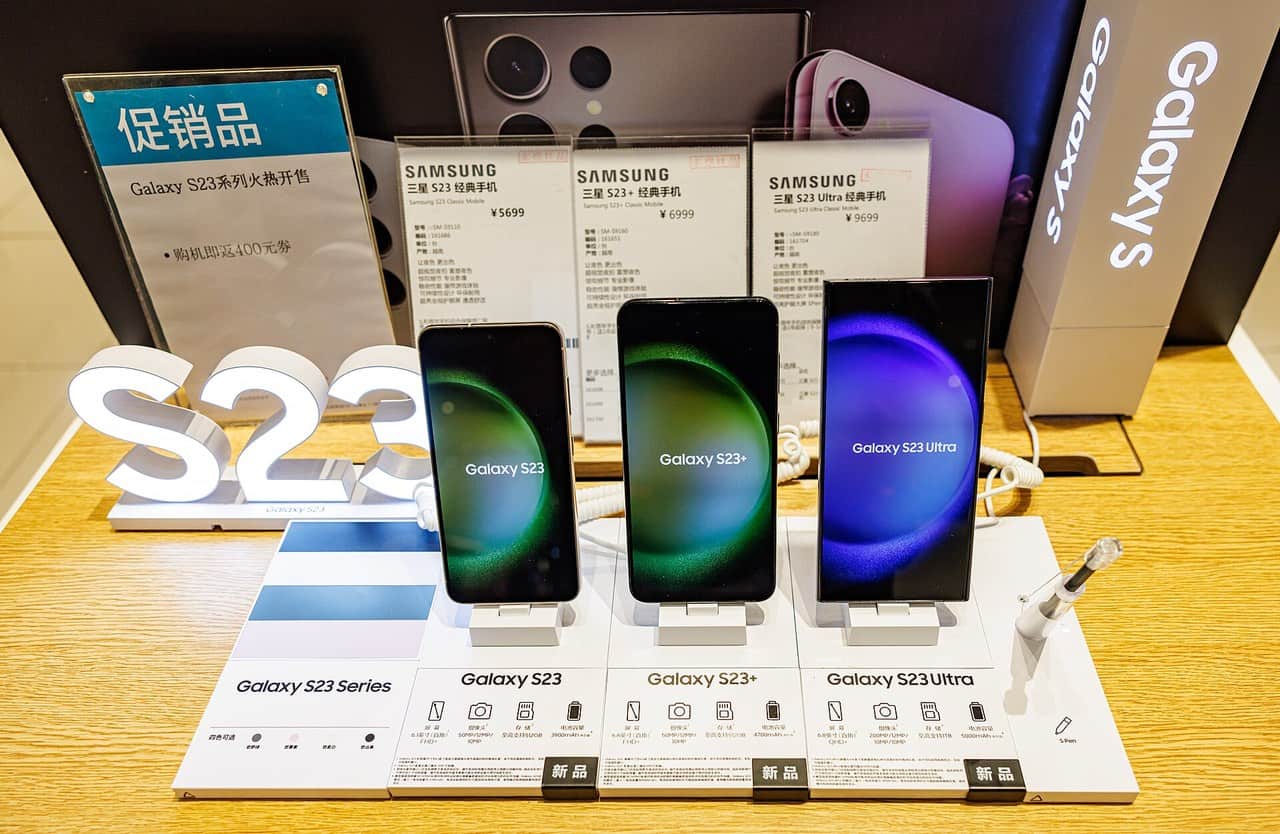
| Samsung, United States | No US green-line program confirmed | Nothing on Samsung’s US support site mentions one. Out of warranty you pay Samsung’s suggested US repair prices, before taxes and fees and varying by location: $174 for a Galaxy S23 or S24 screen, $259 for an S23 Ultra or S24 Ultra, $189 for an S25, $279 for an S25 Ultra. | Prices confirmed on Samsung US |
| Apple iPhone | No program listed | Apple’s service programs page carried no green-line or display-line program when I checked it on September 2, 2026. Inside the first year, Apple’s one-year limited warranty covers “defects in materials and workmanship” under normal use, and a line that appeared on its own is the kind of thing to bring in under it. Out of it, the AppleCare+ screen fee is $29; without AppleCare+, third-party price guides such as Talo list $329 for an iPhone 14 Pro or 15 Pro in 2026, which you should confirm on Apple’s own estimate tool before you go. | Confirmed (no program listed). Prices partly third-party |
| Xiaomi 12 Pro, 13 Pro | Reported free swaps | TechnoBugg claimed in July 2025 that Xiaomi 12 Pro and 13 Pro screens were being replaced free, and supplied no manufacturer confirmation, terms or region. Ask at a Mi service center and expect nothing. | Reported only |
One thing the table can’t show you. Every version of Samsung’s Indian program required the phone to be under three years old, and the One UI 8.5 wave of complaints in May and June 2026 hit Galaxy S23 owners, phones that launched in early 2023. Android Authority says service centers were reportedly quoting 19,500 rupees, roughly $206, to owners outside the free program. If you have an S23 in India, ask at a service center with the invoice, and go in knowing that no free window is confirmed and no outcome should be expected.
What a green line actually is
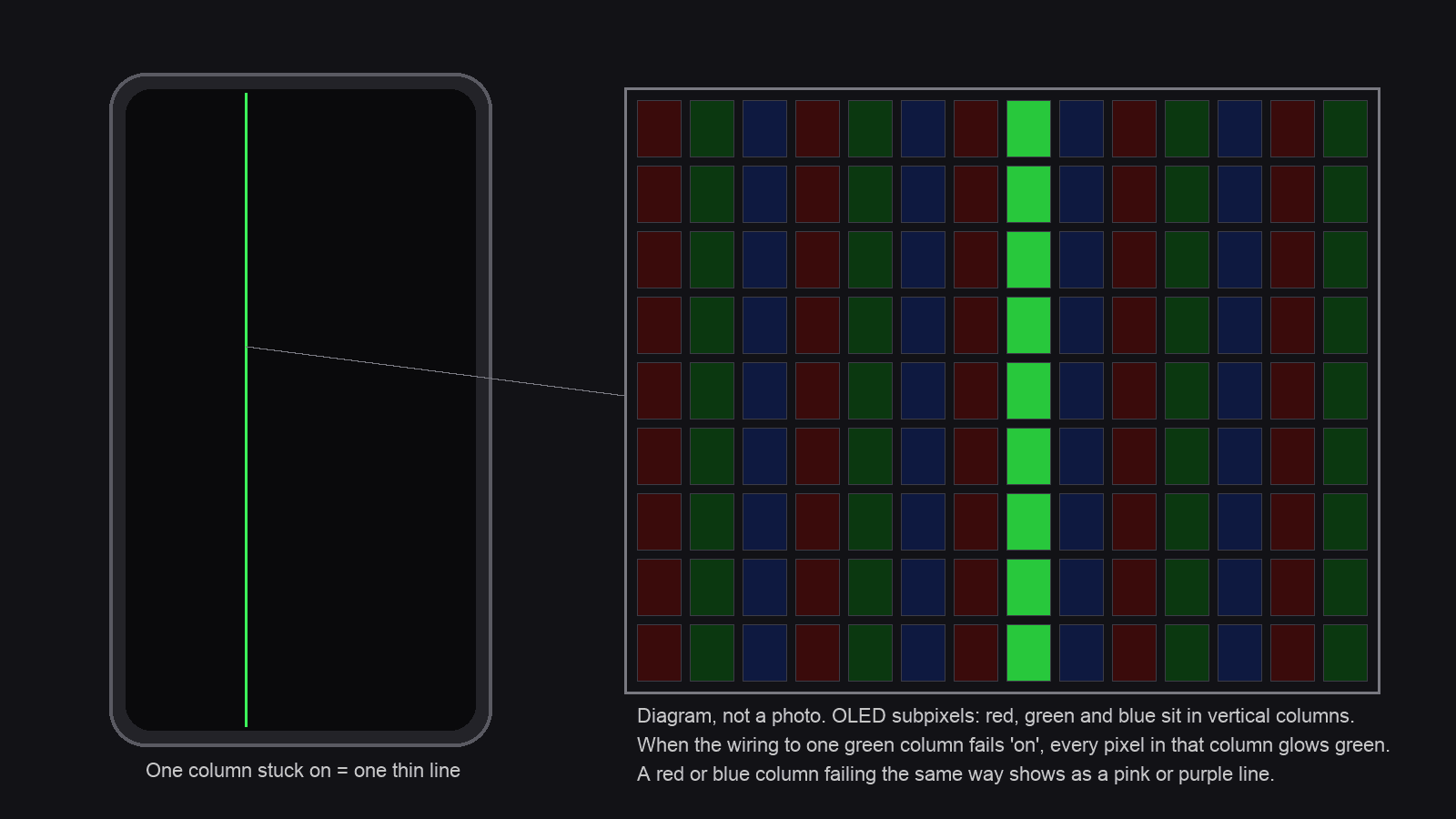
An OLED screen has no backlight. Each pixel is made of tiny red, green and blue subpixels that emit their own light, and iFixit’s iPhone lines-on-screen guide notes that “Green pixels in Apple’s OLED displays are all aligned vertically.” A fault on the electrical path feeding one of those green columns can light or kill the whole column, and iFixit says damage to those lines produces green or purple lines. Red and blue sit in the neighboring columns, which is why the same kind of fault can read pink or purple instead of green.
Where along that path the break sits is the part nobody outside a repair bench can tell you. iFixit lists a display that has come unseated from its connector, a damaged flex cable, a faulty panel and a logic board fault as the candidates for an iPhone, and notes that some line faults can be repaired with laser equipment by specialist shops. In practice, for a phone whose glass is intact, the usual outcome after diagnosis is a new display assembly, and that’s what every price below refers to. The one manufacturer statement on cause I found is OnePlus’s. When it announced its lifetime warranty in December 2024, it tied the fault to prolonged heat and humidity and described a new edge sealant and heat testing it had added to production, per Android Police’s report of the announcement. Samsung, Apple and Google have published no cause on their display pages.
The test that separates software from hardware
Do these in order. The first one answers the question for most people, and the catch in it is the reason most people get it wrong.
- Take a screenshot, then send it to another device and look at it there. A screenshot is what the phone’s graphics chip rendered. Viewing it on the same broken screen tells you nothing, because the hardware line sits on top of whatever you open. Message it to a friend, AirDrop or Quick Share it to a laptop, or upload it to your photo cloud and open it on a computer. If the line is in the file, something in software drew it. If the file is clean, the line is being produced by the display hardware. iFixit uses the same check on its Pixel guide and calls a clean screenshot a likely hardware fault. Strong evidence, and the strongest you can get at home.
- Restart, and watch the boot logo. The logo is drawn before your apps load, so a line across it points hard at hardware. It doesn’t tell you which part of the hardware.
- Install any waiting update. Then, on Android, try Safe Mode, which boots the phone without downloaded apps. The way in varies by maker. On a Galaxy, Samsung’s own lines-and-dead-pixels page walks it, and Samsung’s ladder is update, then Safe Mode, then factory reset, then a service center. On a Pixel 6 or later, Google’s safe mode page has you hold Power and Volume Up, then touch and hold Power off or Restart, and tap OK. On other Android brands the button combination differs, so use the maker’s page for your model. iPhones have no user-facing Safe Mode. An update and a restart are the easy steps there, and iFixit’s last software test is a backed-up restore from a computer, which erases the phone, so do it only if a diagnosis still needs it.
Safe Mode rules out an app. It can’t rule out a firmware or display-driver problem, which is why a line that survives everything above still gets a diagnosis at a service center before anyone orders a part. A factory reset is the step Samsung and iFixit list last and, once the screenshot test says hardware, the one I’d skip. It erases the phone, so if you do run it, verify a complete backup and know your account passwords first. iFixit says a reset “is unlikely to resolve this issue” for a constant line, and you’d spend an evening restoring the phone to learn that.
Touch usually keeps working through all of this, because the touch layer is separate from the pixel matrix. A phone with a green line and a working touchscreen is normal for this fault. It isn’t a sign the problem is minor.
Will it spread?
Repair shops and tech sites say yes, usually. No manufacturer says anything. I checked Samsung’s, Apple’s, Google’s and OnePlus’s pages on the fault and none of them addresses progression at all. So manufacturer guidance can’t tell you whether yours will spread, and neither can I. Extra lines appearing over weeks are widely reported. A single line staying exactly as it is for a year is also widely reported. As a precaution, photograph the screen against a white background with a second phone, date it, and compare in two weeks. That’s the only measurement you’ll get.
Why it seems to appear after an update
Two waves of Galaxy complaints, one after the April 2024 One UI update and one after One UI 8.5 in May and June 2026, blamed the update. Samsung hasn’t commented on either, per Android Authority and Notebookcheck, and no manufacturer has ever confirmed that software created a line. The explanation journalists reach for is that a big install runs the phone hot, and heat is the one cause a vendor has actually named. Treat that as a plausible reading and nothing more.
One trap to avoid. The One UI 8.5 beta changelog for the S23 lists a “green line” fix. Sammy Fans read the entry and found it refers to green lines in 4K HDR video recordings, a camera bug. It isn’t a fix for the display fault, and installing the beta to chase it won’t help.
What the repair costs, and the cheap route that isn’t
Published prices and estimates, checked September 2, 2026:
| Route | Galaxy S23 | iPhone 14 Pro | Note |
|---|---|---|---|
| Manufacturer, out of warranty, US | $174 screen only, $209 with bezel and battery | $329 per third-party guides; confirm with Apple | Genuine part, same-day walk-in at Samsung |
| AppleCare+ or Samsung Care+ | Per your plan | $29 service fee | The fee is the point of the plan |
| Do it yourself, iFixit kit | $167.99, aftermarket, and out of stock when I checked | $99.99, aftermarket in-cell LCD | Read the warning below before choosing this row |
| Independent shop | Roughly $200 to $350 for an OEM panel, per one Denver shop’s price list | No model-specific quote found; the same shop lists $280 to $450 for the 12 Pro and 13 Pro | One shop’s figures. Get your own quote |
The line I’d underline is the Samsung one. Samsung’s own genuine S23 screen costs $6 more than iFixit’s aftermarket kit, and Samsung fits it. On the iPhone side the $99.99 kit looks like a bargain until you read that it’s an LCD going into a phone designed around OLED, and iFixit says so on the listing.
The do-it-yourself row carries risks the price doesn’t show. iFixit rates the S23 screen swap as difficult. Its iPhone 14 Pro listing says the original screen’s sensor assembly has to be moved across to the new one, and that damaging it disables Face ID. On any modern phone, opening it means heating the glue, prying next to a lithium battery, and losing the water seal, and you’ll want a full backup first because a slip can leave the phone unbootable. If you’ve never done one, the $6 difference on the Samsung row settles it.
What won’t fix it
- Pixel-fixer apps and flashing videos. They cycle colors to unstick a liquid-crystal cell. An OLED has no liquid crystal, and a whole column failing is a signal-path fault.
- Pressing on the line. It can turn one line into several.
- A factory reset. See above.
- Waiting for the next update.
The decision
If the screenshot comes up clean on another device, treat the line as hardware, and there are three questions left. Is your phone a Pixel 8 or 9 Pro, or a OnePlus bought in India? Then it may be free, and you should book the inspection before the three-year clock or the parts supply runs out. Is it a Galaxy in India? Ask at a service center with the invoice, knowing the last reported window closed in December 2025. For everything else, check what still applies first, the maker’s warranty, AppleCare+ or Samsung Care+, carrier insurance, and your consumer rights where you live. If none of those does, expect a paid repair, and the price table above is where to start. If the phone is older than three years and the line is the only thing wrong with it, a $174 screen on an S23 is a reasonable spend, and a $329 screen on a 14 Pro is the point at which I’d price a replacement phone first.
If the line came with a crack, a drop, or a swim, Google’s program terms say damage may disqualify the phone and the service provider decides at inspection, and Samsung India’s conditions excluded physical and water damage outright. Then the damage guide takes over: what a cracked screen actually costs to fix. And if what you have is a spot, or lines in another color or direction, we cover those separately in bright spots on a phone screen and lines on a phone screen, by direction and color.

Shivam has been working as a Tech journalist since 2014. He has worked at many Tech news blogs and Amazon India after that he joined TheLeaker in 2017 as a staff writer and now he’s an editor on the portal. When he is not working, you can find him playing games and listening to pop music. You can find him on Facebook and Twitter and can also contact him via email at [email protected]