
Carrier Hub is a legitimate preinstalled T-Mobile app, not malware and not spyware. You have probably just found it near the top of your battery screen, or hit a “Carrier Hub Processing requests” notification that will not go away. Almost nobody installs it deliberately, which is why the first assumption is usually the worst one.
The quick answer: Carrier Hub is a legitimate preinstalled app from T-Mobile in the United States, originally built by Sprint and carried over after the two merged in 2020. Its package name is com.sprint.ms.smf.services and it supports carrier features on the network, most importantly Wi-Fi calling and VoLTE. It is not malware. It is, however, well known for battery drain and for a persistent “Processing requests” notification, which is the app waiting on a carrier request that never completed. You can disable it, and on many phones remove it with ADB, but doing so can break Wi-Fi calling, so check what you use before you do.
What it is and why it is on your phone
Carrier Hub arrived on Sprint devices and stayed after the T-Mobile merger completed on 1 April 2020. On newer handsets it may appear as Carrier Hub Magenta, which is the same app under T-Mobile branding.
It handles carrier side network functions rather than anything you interact with directly. In practice that means Wi-Fi calling, VoLTE registration, and network diagnostics the carrier uses to manage service on your line. There is no real user interface, which is part of why it feels like something that should not be there.
You will only see it on US carrier handsets from T-Mobile, Sprint, or their prepaid brands such as Metro and Boost. It does not appear on unlocked international phones, and it is not present on Verizon or AT&T devices.
“Carrier Hub Processing requests”: what it actually means
This is the single most searched complaint about the app, and the wording is unhelpful because it never says which request or what it is waiting for.
Carrier Hub talks to T-Mobile’s back end on your phone’s behalf. Every time it starts a conversation with the network, it posts a notification saying it is processing a request, and clears that notification when the network answers. The normal case lasts a few seconds after a restart, while the phone reattaches to a tower.
The notification sticks when the answer never arrives. In practice that means one of four things:
- Weak or absent signal at the moment the request was sent, which is why it often appears after a restart in a basement, a lift, or on a plane.
- A failed carrier handshake, where the network accepted the request but did not respond.
- A corrupted app cache, usually after a system or carrier services update.
- A SIM that is no longer a T-Mobile SIM, so there is no back end for the app to reach at all.
You may see a closely related message reading MCM Client Requests Processing. MCM stands for Mobile Content Management, and it is the same mechanism under a different label. The fixes below apply to both.
Try in this order:
- Move somewhere with signal and restart. Do this first. If a weak signal caused it, this alone clears it and nothing else is wrong.
- Force stop it: Settings, then Apps, show system apps, Carrier Hub, then Force stop.
- Clear its cache from the same screen, then restart the phone. Use Clear cache rather than Clear storage.
- Toggle airplane mode on for fifteen seconds and off, which forces a fresh network attach.
- Turn its notifications off: same screen, Notifications, then toggle off. This hides the symptom rather than fixing it, which is fine if the phone is otherwise working normally.
- If it persists, disable the app entirely (see below).
One case deserves separating out. If you are on a T-Mobile handset but have moved to another carrier’s SIM, this notification will keep returning no matter how many times you clear the cache, because the app is trying to reach a network you are no longer on. Disabling it is the correct fix there, and it costs you nothing, since the features it provides only work on T-Mobile anyway.
Battery drain
Widely reported, and a real effect rather than misread battery statistics. It has generated sustained complaints on Reddit, XDA and the Play Store, particularly on Samsung and Pixel devices.
Before disabling anything, restrict its background activity: Settings, then Apps, show system apps, Carrier Hub, then Battery, then set to Restricted. That often resolves it while keeping the app functional.
You can also revoke its usage access, which stops it collecting device usage data without removing it. Search Usage data access in Settings, find Carrier Hub, and turn it off.
There is no Carrier Hub app for you to install
Searching for “Carrier Hub app” turns up a row of sites offering it as a download. Skip all of them. Carrier Hub is a system component that ships inside your phone’s firmware, and a copy downloaded from a third party file mirror cannot work the way the built in one does.
That is checkable rather than a matter of opinion. As of August 2026 both of Carrier Hub’s own Play Store entries, com.sprint.ms.smf.services and com.tmobile.ms.smf.carrierhub, return Not Found, while Google’s Carrier Services listing loads normally. So the pages ranking for “Carrier Hub APK” are offering a system app that no longer has a live official listing behind it.
Two reasons it cannot work anyway, both practical rather than theoretical:
- It has to be signed by the firmware. System apps get privileges normal apps cannot request. A sideloaded copy installs as an ordinary app without those privileges, so it cannot register Wi-Fi calling even if it launches.
- It is carrier and device specific. The build on a Galaxy on T-Mobile is not the build on a Pixel, and installing the wrong one achieves nothing.
If you removed Carrier Hub and want it back, restore it rather than download it. On a phone where you disabled it, re-enable it in Settings, then Apps. On a phone where you removed it with ADB, the restore command further down brings back the original copy that is still in the firmware. A factory reset also returns it.
If you do not have it and you are on T-Mobile, that is normal. Unlocked and international handsets never shipped with it, and Wi-Fi calling on those phones is handled by the manufacturer’s own software instead.
Can you disable or remove it?
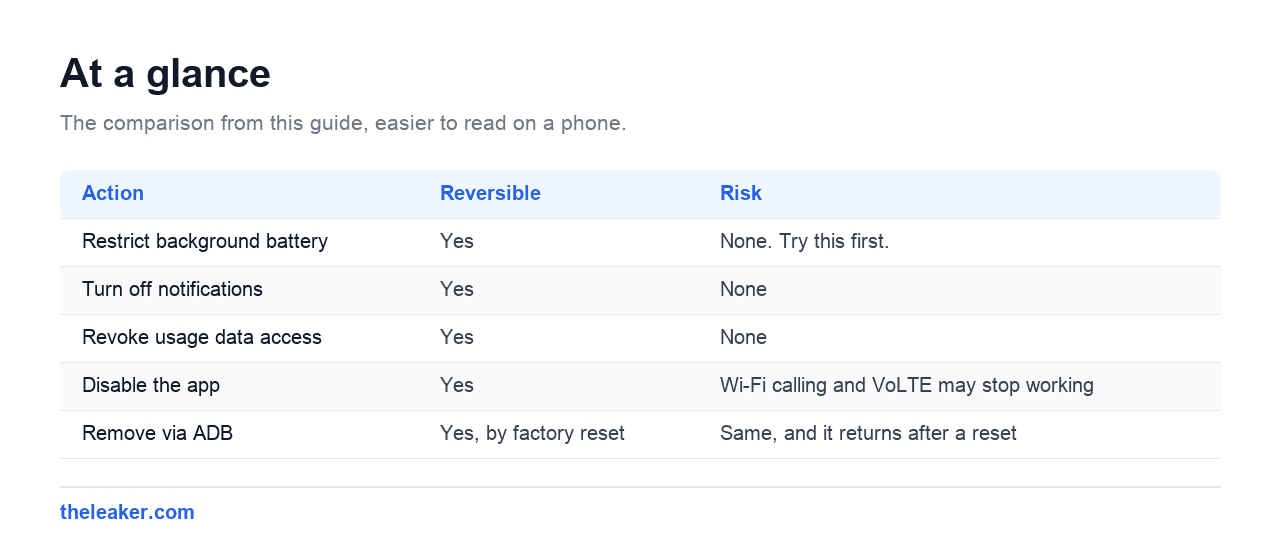
Yes, with a trade-off you should understand first.
| Action | Reversible | Risk |
|---|---|---|
| Restrict background battery | Yes | None. Try this first. |
| Turn off notifications | Yes | None |
| Revoke usage data access | Yes | None |
| Disable the app | Yes | Wi-Fi calling and VoLTE may stop working |
| Remove via ADB | Yes, by factory reset | Same, and it returns after a reset |
Disabling it
Go to Settings, then Apps, show system apps, Carrier Hub, then Disable. If Disable is greyed out, tap Uninstall updates first.
Then test the things it supports: make a Wi-Fi call, and check that calls still connect normally on mobile. If either breaks, re-enable it from the same screen.
Removing it with ADB
For a user level removal that survives reboots but not a factory reset, with USB debugging enabled:
adb shell pm uninstall --user 0 com.sprint.ms.smf.services
This removes it for your user without root. To restore it later:
adb shell cmd package install-existing com.sprint.ms.smf.services
Before doing this, be honest about whether you use Wi-Fi calling. If you rely on it for indoor coverage, removing Carrier Hub is likely to cost you more than the battery it saves.
Is it spyware?
It is not malware, and it is signed by the carrier rather than sideloaded. The reasonable objection is a privacy one, because it has usage data access and reports network diagnostics to the carrier. Whether that is acceptable is a judgement call, and revoking usage data access addresses most of it without breaking calling features.
Check this, as with any well known system app name. The genuine package is exactly com.sprint.ms.smf.services. Anything with a similar but not identical name, appearing as a normal uninstallable app, is worth a closer look.
Other carrier apps you will find next to it
Carrier Hub rarely appears alone. These are the other preinstalled packages people find in the same list and ask the same question about. If the app that sent you looking was on a Motorola rather than a T-Mobile phone, CQATest is the one people most often find that way, and it is a factory test tool rather than a carrier component.
| App / package | Carrier | What it does | Safe to disable? |
|---|---|---|---|
Carrier Hubcom.sprint.ms.smf.services |
T-Mobile / Sprint | Wi-Fi calling, VoLTE, diagnostics | Yes, but tests Wi-Fi calling first |
Carrier Servicescom.google.android.ims |
All | RCS chat features in Messages | Only if you do not use RCS |
| Device Health Services | All | Battery and performance telemetry | Yes, minor impact |
| T-Mobile / Metro apps | T-Mobile | Account and billing | Yes |
| DT Ignite / Digital Turbine | Several US carriers | Installs promoted apps | Yes, this one is unwanted |
Carrier Hub and Carrier Services sound alike and do different jobs. Carrier Services (com.google.android.ims) is Google’s, and it powers RCS messaging. Disabling it breaks read receipts and typing indicators in Google Messages.
Frequently asked questions
I am not on T-Mobile or Sprint. Why do I have it?
Usually because the handset was originally sold by one of those carriers, even if you now use a different SIM. It stays through carrier changes because it is baked into the firmware.
Will disabling it stop my phone working?
Calls and data continue. Wi-Fi calling and VoLTE are the features at risk, so test both afterwards and re-enable if something breaks.
It came back after a factory reset.
Expected. ADB removal only clears it for the current user, and a reset restores the firmware image including Carrier Hub. You would need to repeat the removal.
Does it use mobile data?
A small amount, for network registration and diagnostics. It is not a meaningful share of a normal data allowance, and the common complaint is battery rather than data.
What is MCM Client Requests Processing?
The same mechanism under a different name. MCM stands for Mobile Content Management, and the notification means a carrier request is still waiting on a reply. Treat it exactly like the Carrier Hub version. Restart somewhere with signal, then clear the cache if it returns.
Is Carrier Hub the same as Carrier Services?
No, and the similar names cause a lot of confusion. Carrier Hub is T-Mobile’s, package com.sprint.ms.smf.services, and handles Wi-Fi calling. Carrier Services is Google’s, package com.google.android.ims, and powers RCS chat features in Google Messages. Its Google Play listing is published by Google LLC, describes the app as supporting RCS messaging in the Messages app, and shows it past five billion installs. Disabling the wrong one breaks read receipts and typing indicators.
Changelog
- 1 August 2026: Page created.
- 8 August 2026: Verified against Google Play directly: both Carrier Hub package listings now return Not Found, which is the evidence behind the warning about third party “Carrier Hub APK” downloads. Sourced the Carrier Services comparison to its Play listing, and linked the CQATest guide for readers who arrived from a Motorola phone.
- 1 August 2026: Added a full explanation of what the “Processing requests” notification is waiting for, the MCM Client variant, the case where a non T-Mobile SIM causes it to repeat, and why the Carrier Hub downloads offered by third party sites cannot work.
Related: What Is com.google.android.gms? Why It Drains Battery and Why You Should Not Disable It

I am the chief editor of TheLeaker. I also maintain the backend stuff of the site. I’m a tech enthusiast and loves to do Python coding in my free time. I have worked at many giant publications like XDA Developers and NXTtech before starting TheLeaker.
You can get in touch with me at Garv[at]theleaker.com.