

CQATest is a factory diagnostic app that Motorola and Lenovo build into their phones, and finding it in your app drawer does not mean your phone is infected. It is normally hidden, and it usually becomes visible after a software update. You cannot uninstall it, because it is part of the system image. You can hide it again, and on most Motorola software the route is Settings, then Apps, then See all apps, then the three-dot menu, then Show system, where you can disable it if Motorola has left that option available on your model. Force Stop will not keep it away. That is the advice most pages give and it lasts until your next reboot.
What CQATest actually is
It is a hardware test harness. Motorola and Lenovo use it on the production line to check the things a factory needs to check before a phone ships: touchscreen response, speakers, microphones, cameras, sensors, vibration, SIM detection and radios.
The app is signed by the manufacturer and ships inside the system image rather than being downloaded, which is why it cannot be removed the way an ordinary app can.
You will see the name expanded to “Certified Quality Auditor Test” on almost every page that discusses it. That expansion is repeated everywhere and attributed nowhere, including by Motorola, so treat it as folklore rather than fact. It does not change what the app does.
Which package is actually on your phone
Search for this app and you will be told its package name is com.motorola.cqatest. That string does not appear to exist. The signed APK listings and a mirrored copy of the app’s source all report something different.
| Property | Value |
|---|---|
| Package name | com.motorola.motocit |
| Publisher | Motorola Mobility LLC |
| Recent versions | 8.0.1 (March 2024, Android 13+), 15.1.0 (October 2025, Android 15+) |
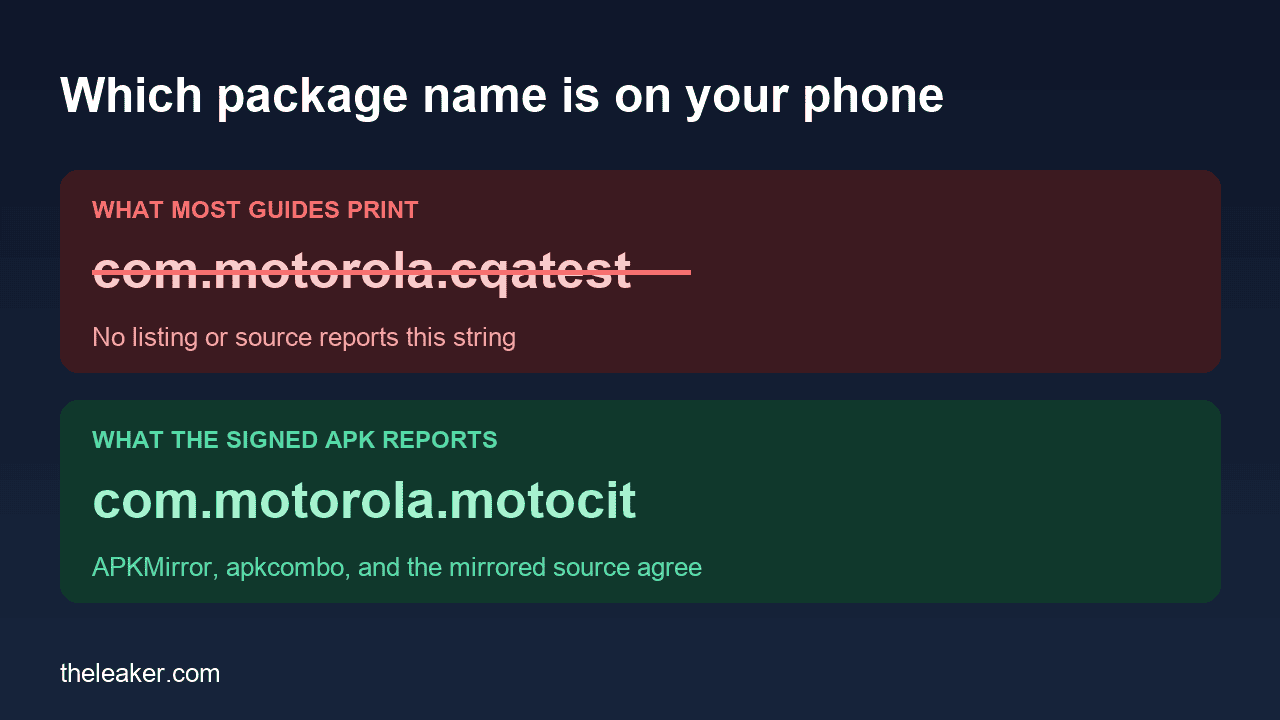
The publisher and version details come from the APKMirror listing for CQATest, which archives APKs pulled from retail firmware, and the same package appears on apkcombo. A publicly mirrored copy of the app’s source agrees, opening with the line package com.motorola.motocit;.
This matters for one practical reason. If you disable the app over ADB using the package name you read on a blog, the command fails and you conclude the app cannot be disabled. It can. You were typing a package that is not on your phone.
Motorola has published nothing about it
Searching Motorola’s own support site for the term returns no results. There is no support article, no FAQ entry and no changelog note explaining what CQATest is, why it appears, or whether you should do anything about it.
That absence is the reason this app generates so much alarm. A phone shows its owner an app they never installed, with a name that sounds like a test, and the company that put it there has never written a sentence about it.
Why it appeared on your phone today
The common thread in user reports is a software update. People describe the icon turning up in the app drawer after an OTA, sometimes alongside other system apps that are normally hidden, and occasionally after a factory reset.
The honest version of the mechanism is that nobody outside Motorola has established one. It is widely reported that an update can leave the app visible when it should be hidden, and that is consistent with what people describe, but it is a pattern in user reports rather than a documented cause. Anyone telling you precisely what CQATest is doing in the background is guessing.
The fix everyone recommends, which does not work
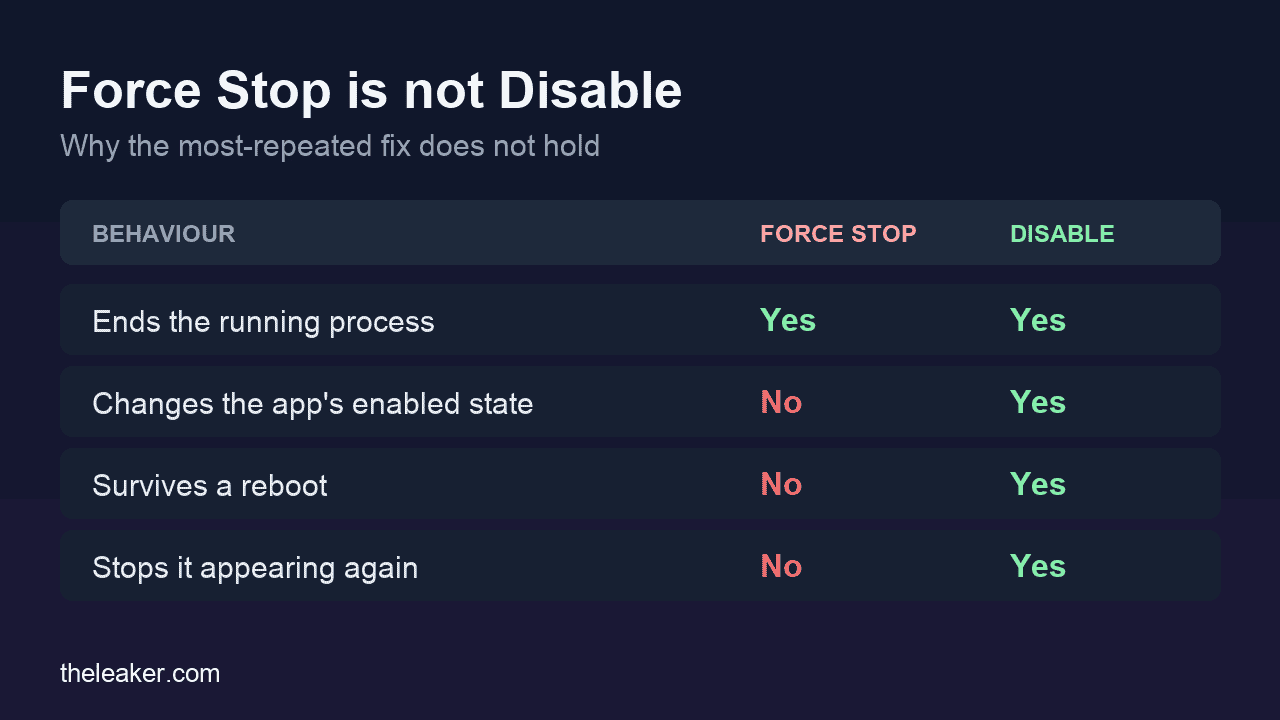
Nearly every page ranking for this app tells you to open it in Settings and press Force Stop.
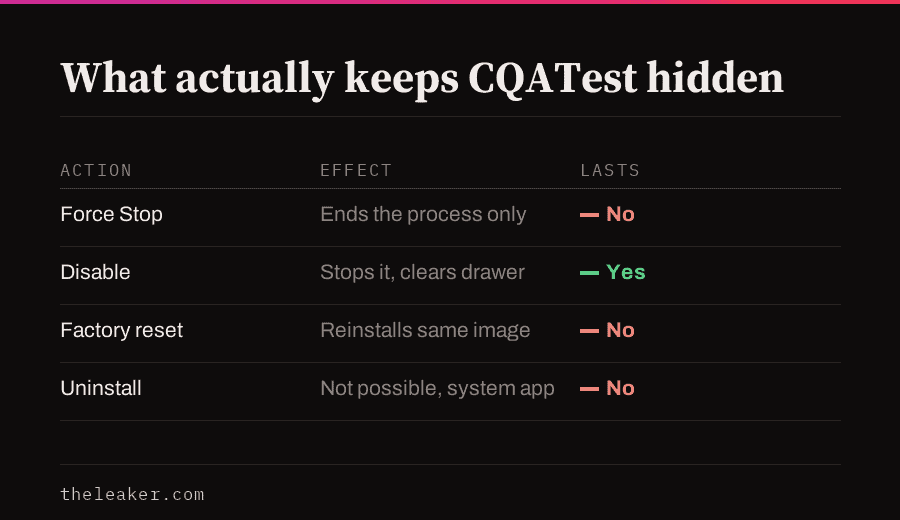
Force Stop ends the app’s current process. It does not disable the app, does not stop Android restarting it when something calls it, and does not survive a reboot. If you force-stopped CQATest last week and it is back, that is not a failure on your part. It is what Force Stop does.
The second common suggestion is a factory reset. A reset reinstalls the same system image the app came in, so the app comes back with it. It also costs you everything on the phone.
Why a dialer code opens it, and why it may now do nothing
Older guides tell you to open the dialer, type a code, and land in the CQATest menu. That works through a documented Android mechanism rather than a Motorola trick. Typing a code shaped like *#*#nnnn#*#* makes Android broadcast an intent, and whichever app registered for that broadcast opens. The mirrored CQATestReceiver is registered for exactly that broadcast, android.provider.Telephony.SECRET_CODE.
Android then tightened it. API level 29, which is Android 10, introduced a replacement broadcast, ACTION_SECRET_CODE, and restricted who may send it to the default dialer or an app holding carrier privileges. On a current Motorola, a dialer code from a 2019 article may simply do nothing.
So if the code fails, nothing is broken. The door it used was closed by Android.
What actually keeps it out of your app drawer
On current Motorola software, system apps live behind a filter. The route is Settings → Apps → See all apps → three-dot menu → Show system, then find CQATest in the list.
Motorola’s menu wording has shifted across Android versions, so on an older device you may see “Apps & notifications” instead of “Apps”, and the system-app filter may sit in a slightly different place. The sequence is the same: all apps, then reveal system apps, then the app itself.
From there, Disable is the option that persists. It stops the app running and removes it from the drawer until something re-enables it, typically the next major software update.
Whether Disable is available at all depends on your model and software version. Manufacturers can mark a system app as non-disableable, in which case the button is greyed out and there is no supported way around it on an unrooted phone. If that is your situation, the app sitting idle in a list is doing nothing to your phone, and the correct action is to leave it alone.
Is it spyware
No. It is a manufacturer-signed component of the operating system your phone shipped with. Nothing arrived later, and it sits in the same category as the setup wizard or the carrier configuration app.
The reason the question comes up so often is that CQATest has every surface characteristic of something suspicious. It has a cryptic name, no icon in some builds, no explanation anywhere, and it appears without warning. Those are the signals people are taught to distrust, and here they happen to be attached to something ordinary.
If you want to check rather than take this on trust, the app’s entry in Settings will show it as a system app, and it will be signed by Motorola. An app that arrived from outside the system image will not be.
What nobody can tell you
- Whether it is draining your battery. No published measurement exists. Your own Settings, then Battery, then Battery usage screen with system apps shown will tell you more than any article can, because it is measuring your phone.
- Why Motorola leaves it in consumer builds. Unanswered, because Motorola has not addressed it.
- Whether a future update will re-enable it. Probably, based on how people describe it recurring.
- What it does when it runs. There are confident technical explanations circulating about background processes and factory servers. None of them cite anything.
Frequently asked questions
It appeared on a Samsung, not a Motorola. Is that the same app?
Unlikely. CQATest is Motorola and Lenovo tooling. Samsung ships its own diagnostic and service components under different names, and a cryptic app on a Samsung phone is more likely to be one of those than this. The general approach is identical: reveal system apps in Settings and check who signed it. Meta App Manager is the other component people most often find this way, and it arrives on phones for a completely different reason. If you want to clear out the apps you actually can remove while you are in there, our guide to removing bloatware from any Android phone covers the ones that will uninstall.
Does disabling it break anything?
Nothing a normal user touches. The app exists for factory and service testing, so the loss is that a service technician running Motorola’s diagnostics would need to re-enable it. That is a step they can take themselves.
Can I remove it permanently with ADB?
Uninstalling system packages for the current user with ADB is possible and it is genuinely not recommended here. The upside is removing an icon from a list. The downside is a modified system state that can complicate future updates, for an app that consumes nothing while disabled.
Why does it come back after an update?
A major Android update replaces the system image, and the replacement arrives with its own default states. Anything you disabled inside that image can return enabled. This is the same reason other system apps you have turned off reappear after a big update.
Sources
- Motorola’s own community forums, where the recurring user reports of CQATest appearing after updates are collected. Note these are user posts, not manufacturer statements.
- Motorola’s support site contains no article on CQATest, which is verifiable by searching it.

A tech Journalist and Photographer, Dhawal Sharma is a technology enthusiast who loves to research the latest innovations and technology. He has contributed to the Honor Community for a very long period and has crucial expertise in writing tech news and reviewing smartphones and laptops. Analyzing and bringing the facts about any piece of tech is what he loves the most. He is a great product photographer and is the Gizmopedia of TheLeaker. Find him on Facebook and Instagram, and you can also email him at [email protected].