

The short answer: for retro consoles on Android, install one app for the system you actually play, and only add an all-in-one later. My default picks in 2026 are Pizza Boy for Game Boy Advance, M64Plus FZ for Nintendo 64, Dolphin for GameCube and Wii, DuckStation for PlayStation 1, and ARMSX2 or NetherSX2 for PS2. If you want one app that runs almost everything, use RetroArch, or Lemuroid if you’d rather it just work without a settings menu the size of a phone book. RetroArch works differently from the rest. It’s a framework that loads separate “cores,” one emulator per system, which trips up a lot of first-time users.
One thing to clear up before you install anything, because it’s the reason this search returns such a mess of results. “Emulator for Android” means two completely different things. This guide is about running old console games on your Android phone. It is not about running the Android operating system itself on a PC, which is what tools like BlueStacks or Android Studio’s emulator do. If you want the second thing, you’re on the wrong page. If you want to play a Game Boy or PS2 game on the phone in your hand, read on.
First decision: one app per console, or one app for everything?
Android splits neatly into two camps, and picking the wrong one is why people bounce off emulation entirely.
- One app per console. A dedicated emulator for a single system (Dolphin for GameCube, for example) is usually the most accurate and the easiest to set up, because every menu is built around one machine. The cost is app clutter if you collect a lot of systems.
- One app for everything. A multi-system frontend runs dozens of consoles from a single library. It’s tidier, but the setup is heavier and the weakest-supported systems lag behind their dedicated apps.
Here’s the judgement I’d actually give a friend, and I hold it a little stubbornly: start with a per-console app for the system you play most, and only reach for an all-in-one once you’re juggling three or four. Installing RetroArch first, before you know what you want, is how a fun afternoon turns into two hours in a configuration screen.
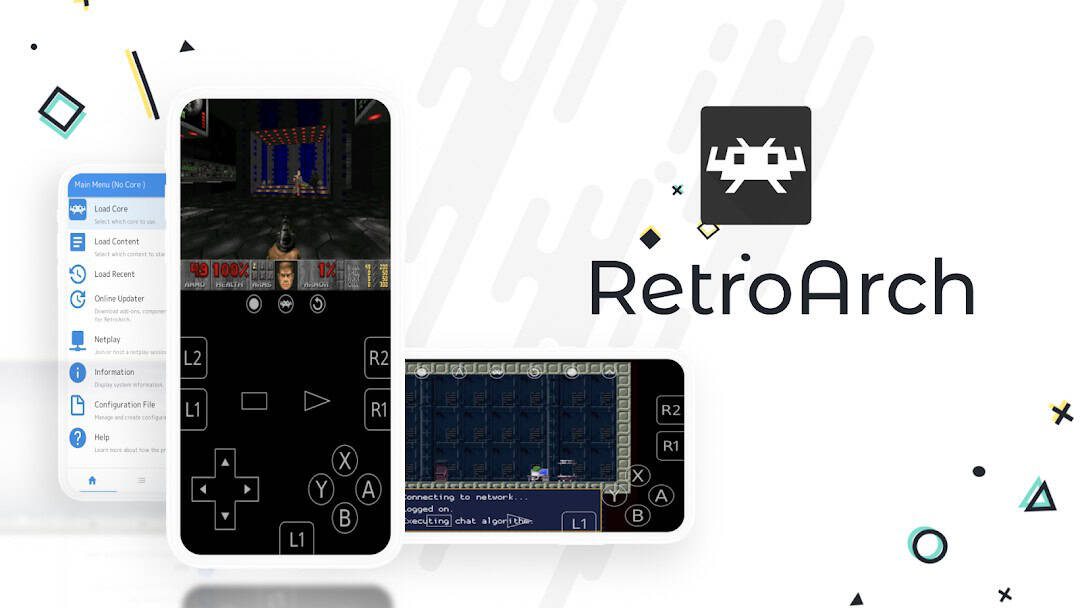
The best all-in-one: RetroArch, or Lemuroid if you want it simple
RetroArch is the heavyweight. It is not itself an emulator; it’s a frontend that loads emulation “cores,” where each core is a separate emulator for a given system. That design is its power and its curse. Once configured it runs nearly everything from one interface, but the first run still makes you pick a core for each system, point it at your game folders and learn its own vocabulary. One detail trips people up: the version on Google Play ships its cores bundled in and has no Core Downloader, so you select the core you need rather than fetching it. If a core you want is not included, RetroArch’s official site APK is the build that carries the full downloader. Set RetroArch up because you want a single home for many systems, and skip it if you just want the fastest path to one game.
If that sounds like a chore, Lemuroid is the gentler option. It’s an open-source frontend built on the same libretro cores RetroArch uses, but it hides the complexity and integrates with Android the way a normal app does. Its developer describes it plainly as an all-in-one emulator that optimizes for ease of use rather than maximum configurability, and you can read the project on its Lemuroid GitHub page. It supports fewer systems than RetroArch and gets fewer tagged releases, so treat it as the friendly on-ramp instead of the power tool.
The best app for each console
This is the part most readers actually came for. Pick your system, install the one app named, and skip the rest.
Game Boy Advance and Game Boy
Install Pizza Boy. It comes as Pizza Boy A (for GBA) and Pizza Boy C (for the older Game Boy and Game Boy Color), each in a free Basic and a paid Pro version, and the developer’s own Pizza Boy A Basic listing on Google Play pitches it as a fast, battery-friendly emulator with save states and shaders. The free Basic build already includes fast-forward and slow motion and is enough for most people; Pro adds Google Drive save syncing, cheats, local and Wi-Fi multiplayer and other extras. If Game Boy is your whole reason for reading, we go deeper in our guide to the best GBA emulators for Android, including the open-source route if accuracy matters more to you than polish.
Nintendo 64
Install M64Plus FZ. It’s a standalone frontend for the Mupen64Plus N64 emulator with the cores and plugins bundled in, and it’s on the Play Store as a free ad-supported app, with a separate M64Plus FZ Pro version (around $3.99) sold alongside it, per the developer’s M64Plus FZ listing. N64 is a famously awkward system to emulate, and a dedicated app like this fixes games that misbehave inside a general frontend, which is exactly why it’s the default rather than a RetroArch core.
GameCube and Wii
Install Dolphin. It is the only serious game in town for these two consoles, it’s free and open-source, and its Android build shares the same codebase as desktop. The official Dolphin Emulator site is clear that the app ships with no games and expects you to supply your own. Dolphin is demanding, so a recent phone with a strong chip is the difference between full speed and a slideshow. This is the one system where old hardware simply won’t keep up.
PlayStation 1
Install DuckStation, with one caveat you should know going in. It remains an excellent, accurate PS1 emulator and its Play Store listing is still live, but its developer has said there will be no further Android updates, a change Android Authority covered when it reported the emulator ending Android support. Android development has ended, so it won’t get fixes for future Android quirks. If it ever breaks on a new OS version, the fallback is the PCSX-ReARMED core inside RetroArch. PS1 emulation needs a console BIOS file the app does not include; read the legal note below before you go looking for one.
PlayStation 2
PS2 is the messiest corner of Android emulation right now, and honesty serves you better than a single confident pick. The long-time favorite, AetherSX2, stopped active development in January 2023 after its developer stepped away, as Android Authority documented when it reported the end of AetherSX2, and it was later pulled from the Play Store. That left two live options, and Android Authority’s comparison splits them by hardware: NetherSX2 for low-end phones, ARMSX2 for midrange and high-end ones. NetherSX2 is a modified build derived from AetherSX2’s older code and is not on the Play Store; the only version worth trusting is the maintained project on Trixarian’s GitHub, because unofficial “NetherSX2” sites and APK mirrors are a known impersonation risk. ARMSX2 is a newer open-source project built on the current PCSX2 codebase, it’s on the Play Store, and its “Refresh” releases have kept coming through 2026, as covered in Android Authority’s look at the ARMSX2 Refresh updates. There’s no settled 2026 winner. On a recent phone, try ARMSX2 first because it’s actively developed and easy to get from the Play Store; on an older or budget device, NetherSX2 is the one to reach for. PS2 also needs its own BIOS, same rule as PS1.
What to avoid, and what an emulator won’t fix
- Apps that come with games built in. A “free emulator” that arrives preloaded with a stack of Nintendo titles is distributing copyrighted ROMs, and those get pulled from stores constantly. Skip them.
- “Cleaner” or booster apps bundled alongside. They add nothing to emulation and usually exist to serve ads.
- A weak phone for demanding systems. No app setting rescues GameCube, Wii or PS2 on an old budget chip. Below that tier, stick to Game Boy through PS1, which run happily on almost anything.
- Unofficial APK mirrors and “modded” reuploads. Prefer the Play Store, or a developer’s own official site or GitHub when an app isn’t on the Play Store, as with NetherSX2. Random mirror sites are where impersonators hide.
An emulator also won’t magically own the games for you, won’t make a 15-year-old handheld game run at a locked 120fps, and won’t turn a phone with no controller support into a comfortable way to play a twin-stick PS2 game. A cheap Bluetooth controller does more for the experience than any emulator setting.
The legal line, stated plainly
This matters, so read it once. Clean-room emulator software, written independently without any of the console maker’s code, can be lawful to build and run. The U.S. case people cite here, Sony v. Connectix, went that way for one such emulator; it is not a blanket ruling that every emulator is legal. The files are a separate question. Copying a game ROM or a console BIOS you don’t have the right to copy is a copyright issue, and distributing encryption keys or circumvention tools raises separate problems under the DMCA’s anti-circumvention rules (Section 1201), not just ordinary copyright. So use only files you legally own and are allowed to copy, and don’t download or share ROMs, BIOS files, keys or circumvention tools. That every recommendation above is about an app’s capability and never about where to find content is deliberate. And that an emulator is listed on the Play Store is a matter of store policy, not legal immunity for any particular use.
Frequently asked questions
Is RetroArch better than a dedicated emulator?
Not usually, and that surprises people. For a single system, the dedicated app (Dolphin, M64Plus FZ, DuckStation) is generally more accurate and far simpler to set up, because it only has to do one thing. RetroArch wins on breadth rather than on any individual console, so its real advantage shows up only once you’re running many systems from one place.
Do I need a rooted phone to emulate games on Android?
No. Every emulator named here installs and runs on a normal, unrooted phone. Rooting was part of the story a decade ago and isn’t now. If a guide tells you to root just to play Game Boy games, it’s out of date.
What is a “core” in RetroArch, and do I have to download one?
A core is the actual emulator for one system, and RetroArch is the shell that loads it, so choosing the Game Boy Advance core is you telling RetroArch which machine to become. Whether you download it depends on the build. The Google Play version ships its cores bundled in and has no Core Downloader, so you just select the one you want. RetroArch’s official site APK is the build that adds a Core Downloader for fetching others. Either way, picking the right core is the single concept that unlocks the whole app.
Can my old or cheap phone handle any of this?
Up to PS1, almost certainly. Game Boy, GBA, N64 and PlayStation 1 run well on modest hardware. GameCube, Wii and PS2 are the demanding tier and want a recent phone with a capable chip; on an entry-level device they’ll stutter no matter what you change.
What about playing these on an iPhone instead?
The apps are different and the history is very different, because Apple only opened the App Store to game emulators in 2024. If you’re on iOS or switching between the two, our companion guide to the best emulators for iPhone covers which apps are actually available there and why some big Android names are missing.
Where to start today
Don’t install five apps. Decide the one system you most want to play, install the single app named for it above, and get one game you own running before you touch anything else. If you already know you’ll collect many systems, set up RetroArch or Lemuroid instead and treat the first evening as setup time rather than play time. The people who enjoy Android emulation are the ones who started narrow.

A tech Journalist and Photographer, Dhawal Sharma is a technology enthusiast who loves to research the latest innovations and technology. He has contributed to the Honor Community for a very long period and has crucial expertise in writing tech news and reviewing smartphones and laptops. Analyzing and bringing the facts about any piece of tech is what he loves the most. He is a great product photographer and is the Gizmopedia of TheLeaker. Find him on Facebook and Instagram, and you can also email him at [email protected].