
If AirPlay is missing from your Samsung TV’s menu entirely, the AirPlay app was not downloaded from Samsung’s server, and a Smart Hub reset is Samsung’s fix. The path is Settings > All Settings > Support > Device Care > Self Diagnosis > Smart Hub Reset, PIN 0000, after which you have to accept the Terms and Conditions and be signed into a Samsung account for the option to come back. That answers the case most owners misread as “my TV doesn’t support AirPlay.” If AirPlay is already in the menu and the phone still cannot reach it, that is a different fault, and the sections below split the two.
Find your symptom first
The fixes barely overlap, so working through all of them wastes an evening. Each row goes to the section that answers it.
| What you see | Section |
|---|---|
| No AirPlay option in the TV’s menu at all | When AirPlay is missing from the menu |
| The TV is older, or you are not sure it qualifies | Which Samsung TVs support AirPlay |
| AirPlay is there, but your iPhone will not connect | When it is in the menu but will not connect |
| It connects, then drops, or anything else | When it is in the menu but will not connect |
| It works in one app but not another | When only one app fails |
| You want Siri or the Home app to control the TV | HomeKit is a separate feature Samsung does not have |
When AirPlay is missing from the menu
This is the case to understand, because the symptom looks like an unsupported TV and usually is not. On a Samsung set that supports AirPlay, the setting lives at Home > All Settings > Connection > Apple AirPlay Settings, though the heading reads General instead of Connection on some model years. If the option is not there at all, Samsung gives the reason: “the application has not been downloaded from the Samsung server.”
Samsung’s fix is a Smart Hub reset:
- Open Menu, then Settings > All Settings > Support > Device Care > Self Diagnosis > Smart Hub Reset
- Enter the PIN, which is 0000 unless you changed it
- When the TV finishes, agree to the Terms and Conditions and sign into your Samsung account
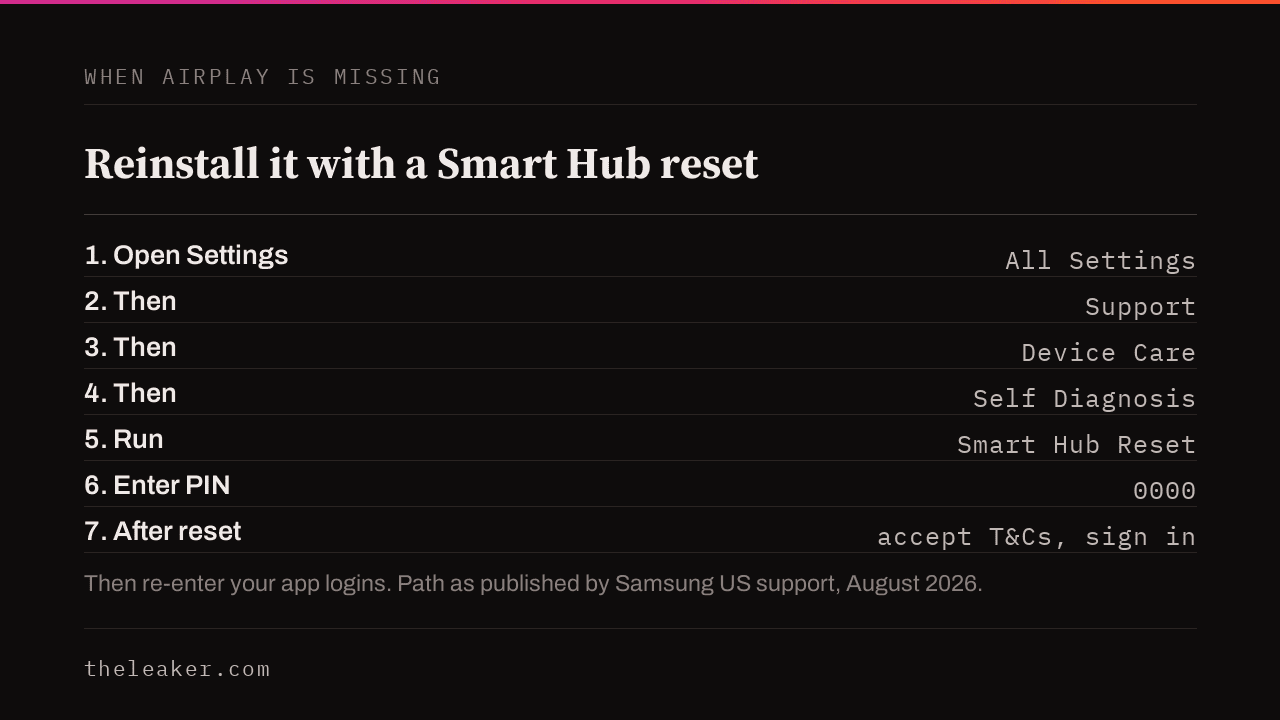
The last step is the one people skip. Samsung’s instructions require both the accepted terms and a signed-in account, so a reset rushed through without them can leave the option still missing. The reset also has a cost: Samsung warns it “will log you out of your favorite apps,” so you will re-enter your streaming logins afterward. Write them down first.
Which Samsung TVs support AirPlay
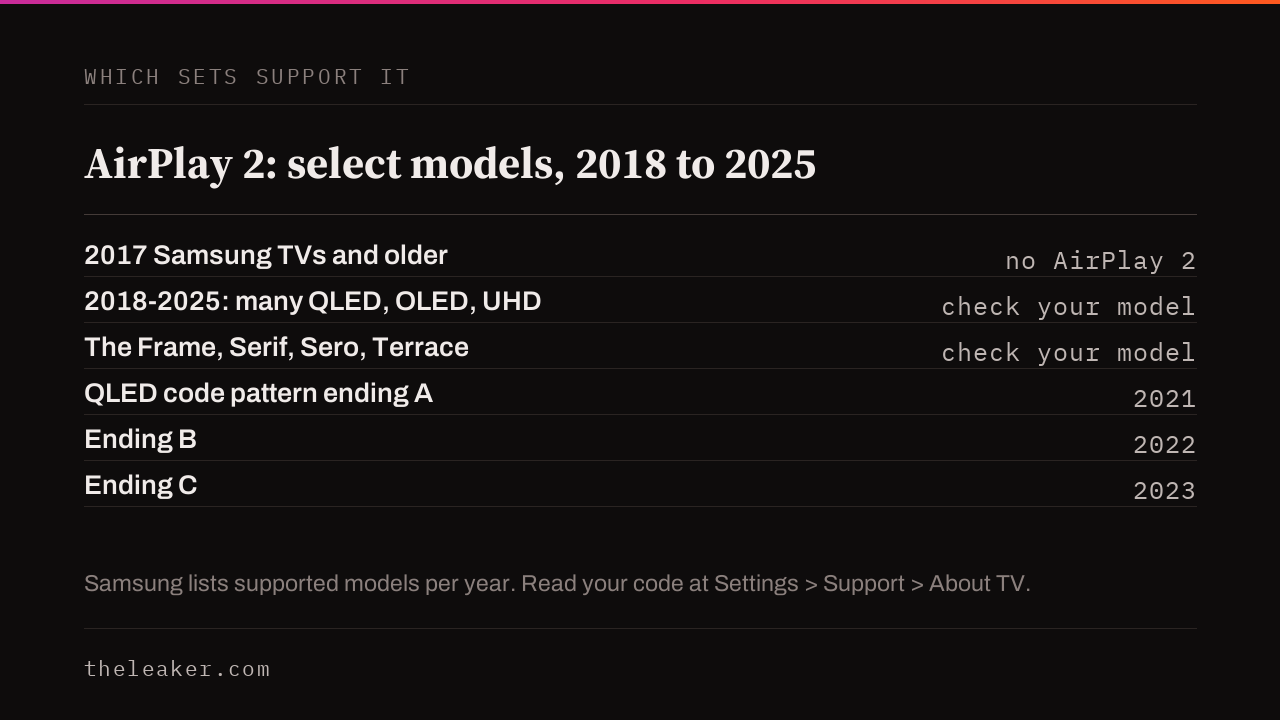
Samsung supports AirPlay 2 on select TV models from 2018 to 2025, across the QLED, Neo QLED, OLED, Crystal UHD and Lifestyle (The Frame, Serif, Sero, Terrace) lines, per Samsung’s current US page. Year alone is not proof, so verify your exact model. A 2017 or older Samsung set was never given AirPlay 2, and no reset or update adds it.
To find your set’s year, read the model code at Settings > All Settings > Support > About TV, then decode it. Within the QLED and Neo QLED model-name patterns, Samsung’s model-number guide identifies A as 2021, B as 2022 and C as 2023. If your letter is A or later, your set is well past the 2018 line and the year is not your problem. If it is older than that, or a Crystal UHD code the QLED pattern does not cover, use the model year printed on that same About TV screen instead of decoding.
When it is in the menu but will not connect
If AirPlay is present and switched on but your iPhone cannot find or hold the TV, Samsung and Apple agree on the first thing to check: the two devices have to be on the same network. Samsung adds a detail Apple does not, and names the frequency: “Your TV and iPhone must be operating on the same network. This goes for network frequency, too.” Work through these in order, cheapest first.
- Compare the two network names. Read the TV’s at Settings > General or Connection > Network > Network Status and check it against the Wi-Fi name on your iPhone. If one ends in “-5G” and the other does not, a router is splitting 2.4GHz and 5GHz into two names; move one device so both match.
- Turn AirPlay off and back on in the same Apple AirPlay Settings screen, then try again.
- Restart the router if the names already match, which clears a temporary connection fault.
- Check for a TV software update at All Settings > Support, where the current and latest versions both show. Update if they differ.
- Then restart the iPhone.
If all of that passes and it still fails, isolate the variable: try AirPlaying from a different Apple device. If a second device works, the first one is the fault and Apple Support is the right desk. If nothing connects from any device on a set that is on the same network and up to date, that is Samsung’s “contact us” case, and their support has the diagnostics its public page does not.
When only one app fails
If AirPlay mirrors your home screen and photos but one streaming app will not cast, the problem is with that app or its content rather than the TV. Samsung’s own check is to try a different app, such as YouTube, Netflix or Photos. Apple notes that some video apps do not support AirPlay at all. If other apps cast fine, take it up with the app rather than the TV, or use that app’s own casting option.
What Samsung’s troubleshooter actually covers
Samsung’s AirPlay troubleshooter is an eight-step accordion, strong at the top and thin at the bottom, read in full in August 2026:
- The strong parts are the first three: the missing-menu explanation, the app check, and the Smart Hub reset with its exact path.
- The network step names the same-frequency requirement most pages omit.
- The remaining steps are the ordinary ones. Restart the iPhone, try another Apple device, check for a TV software update, then contact Samsung.
HomeKit is a separate feature Samsung does not have
This is a recurring dead end, so let us be plain about it. AirPlay sends video and audio from an Apple device to the TV, and it works on any supported Samsung set. HomeKit is the separate feature that lets Siri and the Home app control a TV, and Apple states plainly: “HomeKit isn’t supported on Samsung smart TVs.” Samsung sets also cannot be added to Apple’s Home app. If Siri control was what you were chasing, it is not a fault to fix, and no reset or update changes it.
The Apple side, and the versions that matter
The Apple troubleshooting page a Samsung owner lands on is generic, with no Samsung-specific steps and no router detail beyond the same-network requirement. The version floors are old enough that almost nobody fails them, but they take seconds to rule out. Apple requires iOS 12.3 or later, or macOS Mojave 10.14.5 or later, to send video; audio needs only iOS 11.4 or later.
What will not help, and what this will not fix
- Reinstalling the app on your phone. If other apps can use AirPlay, the fault is with the one app, so reinstalling it is worth a try, but reinstalling every app is not the fix for a missing-from-the-menu TV.
- Factory-resetting the whole TV before the Smart Hub reset. The Smart Hub reset is the narrower step Samsung actually prescribes for a missing AirPlay app; a full factory reset is a bigger disruption aimed at the same thing.
- A Samsung TV from 2017 or earlier. AirPlay 2 was never added to those, and no reset installs it.
- Siri or Home-app control. That needs HomeKit, which Samsung sets do not support.
- A managed network you do not administer. Hotel, campus and office Wi-Fi often keeps devices from seeing each other on purpose, and only whoever runs it can change that.
Frequently asked questions
Why is AirPlay missing from my Samsung TV’s settings?
On a supported set, the AirPlay app did not download from Samsung’s server. A Smart Hub reset at Settings > All Settings > Support > Device Care > Self Diagnosis > Smart Hub Reset is Samsung’s fix, after which you accept the Terms and Conditions and sign into a Samsung account. On a 2017 or older set, the feature was never included.
Does my Samsung TV need to be on 2.4GHz or 5GHz for AirPlay?
Neither band is better on its own. What matters is that the TV and the iPhone are on the same one. Samsung says the frequency has to match, so a router splitting 2.4GHz and 5GHz into two named networks is the common trap.
Can I use Siri to control my Samsung TV over AirPlay?
No. Siri and Home-app control need HomeKit, and Apple states HomeKit is not supported on Samsung smart TVs. AirPlay streaming from your iPhone still works.
Will a Smart Hub reset delete my apps?
It logs you out of your apps, so you re-enter streaming logins afterward. Write them down before you start.
Trying to AirPlay to a Roku instead of a Samsung TV? The failure modes are different, and we cover them in AirPlay not working on Roku.
Streaming from an Android phone instead? See our guide to casting media from your phone to Amazon Fire TV.

I am the chief editor of TheLeaker. I also maintain the backend stuff of the site. I’m a tech enthusiast and loves to do Python coding in my free time. I have worked at many giant publications like XDA Developers and NXTtech before starting TheLeaker.
You can get in touch with me at Garv[at]theleaker.com.