

The first thing to do with a dead Roku remote is work out which kind you have, because a simple infrared remote and a voice remote fail for completely different reasons and need different fixes. If your remote has a microphone or magnifying-glass button, it is a voice remote, and the usual fix is to re-pair it. Restart the Roku, then hold the pairing button for 5 seconds until the light flashes. If it has no mic button, it is an infrared remote, and it needs a clear line of sight to the Roku plus fresh batteries. Either way, install the free Roku mobile app first, which works as a full replacement remote over Wi-Fi while you sort the physical one out.
Almost every “Roku remote not working” guide throws the same ten steps at you regardless of your remote. That wastes your time, because half those steps only apply to one remote type. Roku itself splits the problem in two, and so does this guide. Find your remote first, then jump to its section.
Do this first: put a working remote on your phone
Install the Roku mobile app (iPhone or Android) and sign in, and it becomes a full remote over your home Wi-Fi, complete with a keyboard and voice search. Your phone and the Roku need to be on the same network. This gets you back into your TV immediately, and you can use it to navigate the menus and even re-pair the physical remote. A dead remote does not have to mean a dead evening.
Which Roku remote do you have?
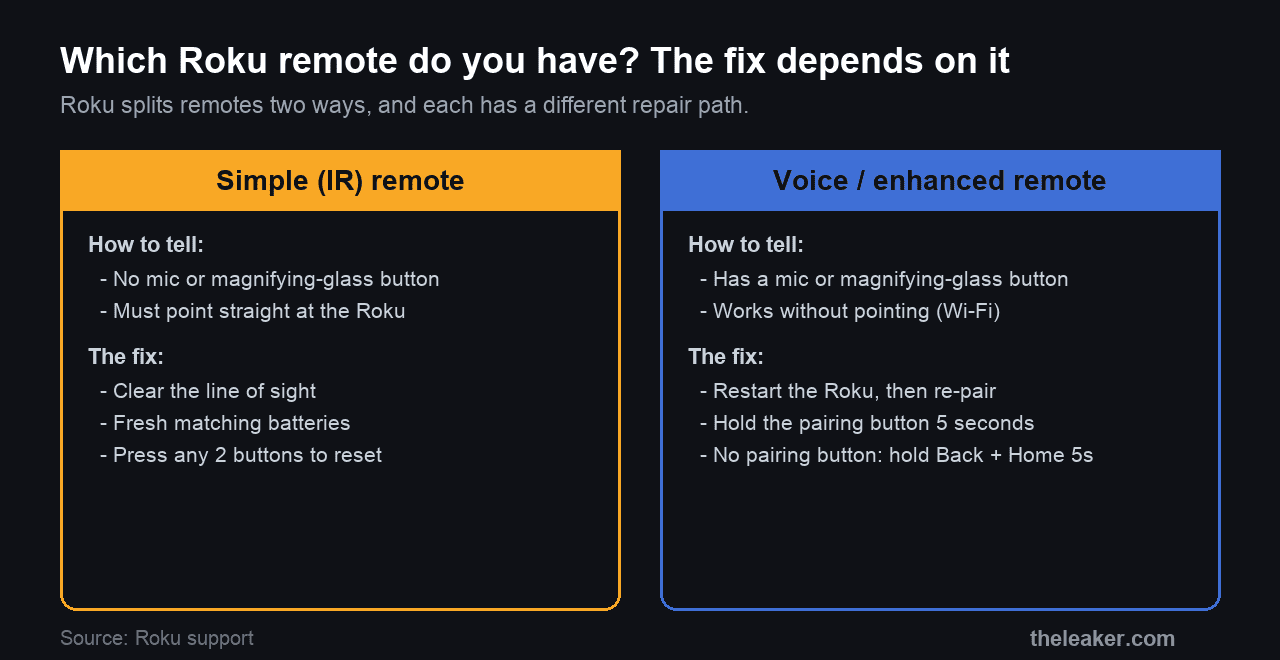
This one check decides everything that follows. Look at your remote.
- Simple remote: no microphone or voice button anywhere on it. It uses infrared, so it has to point straight at the Roku to work, exactly like an old TV remote.
- Voice remote: has a microphone or magnifying-glass button, usually up near the top. Most voice remotes talk to the Roku over a wireless signal rather than infrared, so they work without being pointed at anything, and they are the ones that need pairing.
Get this right before you try anything, because pairing steps do nothing for an infrared remote, and pointing an already-paired voice remote at the box fixes nothing either. All of the specifics below come from Roku’s own remote support page.
Fixing a simple (infrared) remote
An infrared remote has no pairing to lose, so the causes are physical, either something in the way or dead batteries.
- Clear the line of sight. Infrared needs a clear path to the front of the Roku. If the box is tucked behind the TV or inside a cabinet, the remote cannot reach it. Pull the Roku into view, and try aiming from a few different angles.
- Change the batteries properly. Take the old batteries out, press any two buttons on the remote to clear any residual charge, then put in a fresh, matching pair. A mismatched or half-used pair is a common cause of a remote that works intermittently.
If a clear line of sight and known-good batteries still give you nothing, the infrared remote itself has likely failed, and a replacement or the phone app is the answer.
Fixing a voice remote
A voice remote that lights up or once worked but now does nothing has usually lost its wireless pairing to the Roku. Work through these in order.
- Restart the remote. Remove both batteries, press any two buttons, then reinsert the batteries negative end first and replace the cover. On a rechargeable remote, hold the pairing button for 20 seconds instead, or hold Back and Home together for 20 seconds if it has no pairing button, and wait for the light to stop flashing.
- Restart the Roku. Unplug the Roku from power, wait 5 seconds, and plug it back in. Let it reach the home screen before you test the remote.
- Re-pair it. With the Roku on, hold the pairing button in the battery compartment for 5 seconds until the remote’s light flashes. If your remote has no pairing button, hold Back and Home together for 5 seconds instead. Wait for the pairing message to appear on screen.
- Charge or replace the batteries. If the buttons respond weakly, the power is low. Recharge a rechargeable remote for at least 5 hours with its own cable, or fit fresh batteries. You can check the level under Settings, Remotes & Devices, Remotes, your remote, About.
The volume or power buttons don’t work
If you can navigate Roku menus but the volume or power buttons do nothing, the remote is not broken. Those buttons control your TV rather than the Roku, and they do it one of two ways: through infrared, or through a TV feature called CEC.
- Point the remote directly at the front of the TV, where its sensor sits, and press volume. If it works that way, your remote is using infrared and just needed a clearer aim.
- If pointing does nothing, turn on CEC in your TV’s settings (the name varies by brand, for example Anynet+ on Samsung or Bravia Sync on Sony), then re-run Settings, Remotes & Devices, Remotes, Set up remote for TV control on the Roku.
- If both buttons are dead, update the Roku first under Settings, System, System Update, Check Now, then redo the TV-control setup above.
Note that voice commands like “turn off the TV” only work through CEC, never through infrared, so an older infrared remote will never do them no matter what you change.
A quick safety note
Roku flags this on its own page, so it is worth repeating. If the remote ever feels hot to the touch, stop using it, do not pull the batteries out while they are hot, and set it down on a hard, non-flammable surface like tile to cool. A battery that heats up is a battery that has failed, and forcing it is how a small problem becomes a fire.
What this will not fix
- A truly dead remote. If it is dead on fresh batteries and refuses to pair or reset, it has failed, and no amount of retrying changes that.
- Water damage. A spill kills it.
- Getting online without a remote. You cannot connect a Roku to Wi-Fi from scratch without a remote, though the phone app counts as one.
- A Roku streaming stick with weak reception. If a stick’s remote is flaky, use the wireless receiver built into its USB power cable, and ask Roku for a free HDMI extender, which moves the stick away from the TV’s interference.
When it is the remote, and what to do
Some remotes are simply finished, from a drop, a spill, or age, and nothing brings them back. Two options remain, and one is free. The Roku mobile app is a complete stand-in that many people keep using permanently. A genuine replacement remote is the other, and Roku sells them in its accessories store. If you buy a third-party one, check it lists your exact Roku model, because the cheap ones often skip the TV power and volume buttons.
Frequently asked questions
Can I use my phone as a Roku remote?
Yes. The free Roku app turns your phone into a full remote, including voice search and a keyboard for typing, as long as the phone and the Roku are on the same Wi-Fi network. It also works as a stand-in while you re-pair or replace the physical remote.
Why does my voice remote need pairing but my old Roku remote never did?
Because they use different technology. A simple remote sends infrared light, the same one-way signal a traditional TV remote uses, so it needs no setup but must point at the device. A voice remote uses a two-way wireless connection, which is what lets it work without pointing and carry voice, and that connection has to be paired.
How do I know if the problem is the remote or the Roku itself?
Open the Roku app on your phone. If the app controls the Roku normally, the Roku is fine and the fault is in the physical remote. If the app cannot reach the Roku either, the problem is the Roku or your network, not the remote.
My Roku remote keeps saying low battery even after new batteries. What now?
Restart the remote (batteries out, press two buttons, batteries back in), and make sure the new pair is a matching, good-quality set. If it persists, an old second remote paired to the same Roku can confuse the reading, so disable any spare by removing its batteries or holding Back, Home and Mute together for 5 seconds.
The short version
Check for a microphone button first. No mic means an infrared remote that needs a clear line of sight and fresh batteries. A mic means a voice remote that needs re-pairing, so restart the Roku and hold the pairing button for 5 seconds. Grab the Roku app so a dead remote never locks you out, and remember that dead volume buttons are a TV-control setting, not a broken remote. If it is truly dead, the app is free and a replacement is cheap. While you are here, our guide to fixing AirPlay on a Roku is a useful companion.
Featured image: Roku remote by Texas Lane, via Wikimedia Commons, licensed CC BY-SA 4.0.

I am the chief editor of TheLeaker. I also maintain the backend stuff of the site. I’m a tech enthusiast and loves to do Python coding in my free time. I have worked at many giant publications like XDA Developers and NXTtech before starting TheLeaker.
You can get in touch with me at Garv[at]theleaker.com.