
Unplug the power cord from the back of the console, wait 10 seconds, plug it back in, then press the Xbox button on the front. That is the first thing Microsoft tells you to do for a Series X or Series S that will not start, and there are three more checks after it if that one fails. Ten seconds is the published figure, and it is far shorter than people expect. If it comes on, you are done, though read the next section anyway, because Microsoft expects this one to need repeating.
This covers Xbox Series X, Series S, Xbox One X and Xbox One S. The original Xbox One is a different machine with an external power supply and its own procedure. Be warned before you go looking for parts: that page states the original console “is no longer manufactured by Microsoft, nor is the console power supply unit”, and that “out-of-warranty support is no longer available for this particular product”.
What the 10 seconds is actually doing
Microsoft’s support page gives a reason, which is unusual for this genre: “Often, power issues are due to the power supply resetting after a power surge.” Note the “often”, which is as far as they commit. My own reading of it is that the supply has tripped a protection state and holds it until mains power goes away, but that page describes no mechanism, so treat the explanation as mine.
The steps as published are:
- Unplug the power cord from the console.
- Wait 10 seconds.
- Plug the cord back in, then press the Xbox button on the front of the console.
The page adds a line most people skip past: “If the console turns on, the internal power reset worked. Do this step if the problem happens again.” They expect it to recur, in other words, and the advice is to repeat the same step. If it starts happening often, and if surges really are the usual cause as that page suggests, then what else shares the circuit is worth a look. That last step is my inference. Microsoft does not suggest it.
Ten seconds sounds too short, so people assume they did it wrong
Ten seconds is so much shorter than the figures attached to other consoles that a common reaction is to distrust it, wait longer, and try again. Waiting longer does no harm here, since ten seconds is a minimum and not a window. It also will not turn a failed reset into a successful one, and repeating it is where people lose an evening.
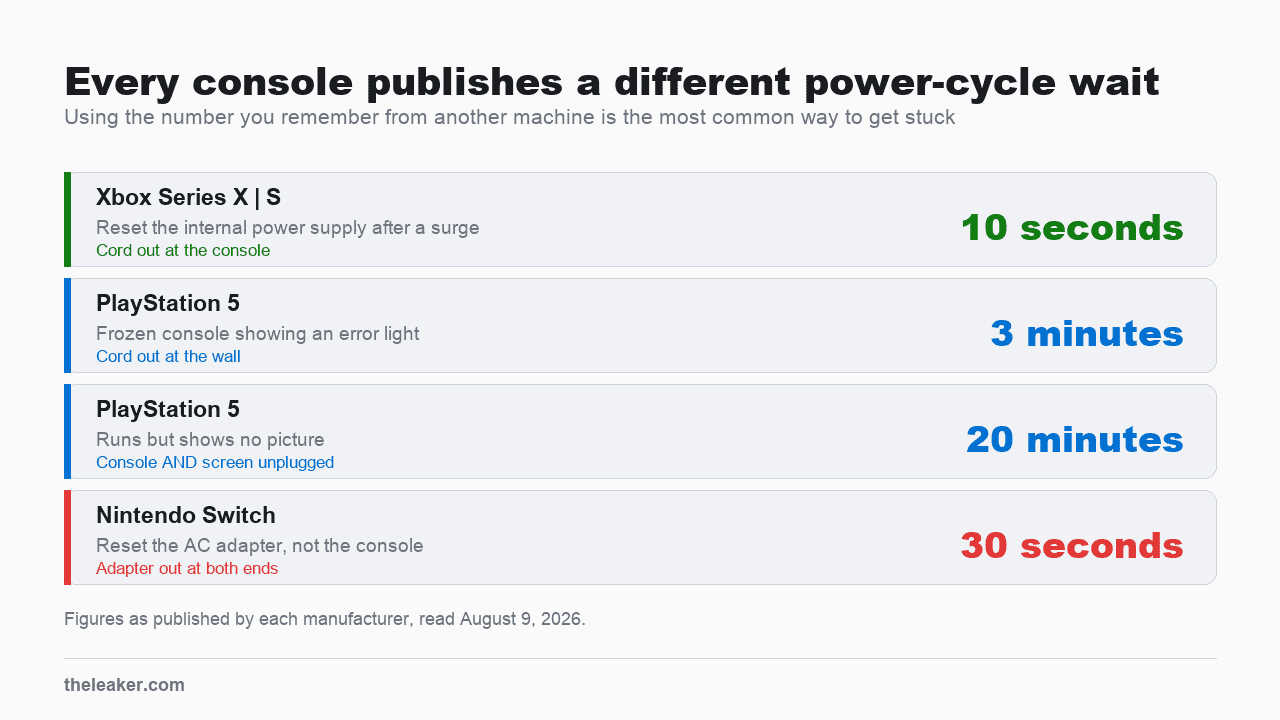
| Console | Published wait | What it is for |
|---|---|---|
| Xbox Series X and S | 10 seconds | Resetting the internal power supply after a surge |
| PlayStation 5 | 3 minutes | A frozen console showing an error light |
| PlayStation 5 | 20 minutes | A console that runs but shows no picture, screen unplugged too |
| Nintendo Switch | 30 seconds | Resetting the AC adapter, not the console |
Note the table covers the Switch family rather than the Switch 2, which publishes its own no-power procedure. The Xbox number is shorter because it is a different operation. On a PS5 the long wait covers the console and the screen together. The Switch instruction targets the power adapter. Here the target is a protection circuit inside the console, which simply needs mains power removed briefly. If you have already tried ten seconds and nothing happened, waiting ten minutes instead will not help, and that is the loop people get stuck in. The rest of this page is the useful next step.
For the other two, see PS5 won’t turn on and Nintendo Switch won’t turn on.
There is no power brick to replace on a Series X
Search this symptom and a good deal of what comes back tells you to test the power brick, replace the power brick, or watch the light on it change color.
None of that applies. In Microsoft’s words, “Xbox Series X|S, Xbox One X, and Xbox One S have an internal power supply that works in all regions worldwide.” There is no external brick. What runs from the wall to the console is an ordinary mains cable. It holds no electronics and carries no indicator light, so there is nothing on it to test or read, though a lead can still fail at a plug or a bend like any other.
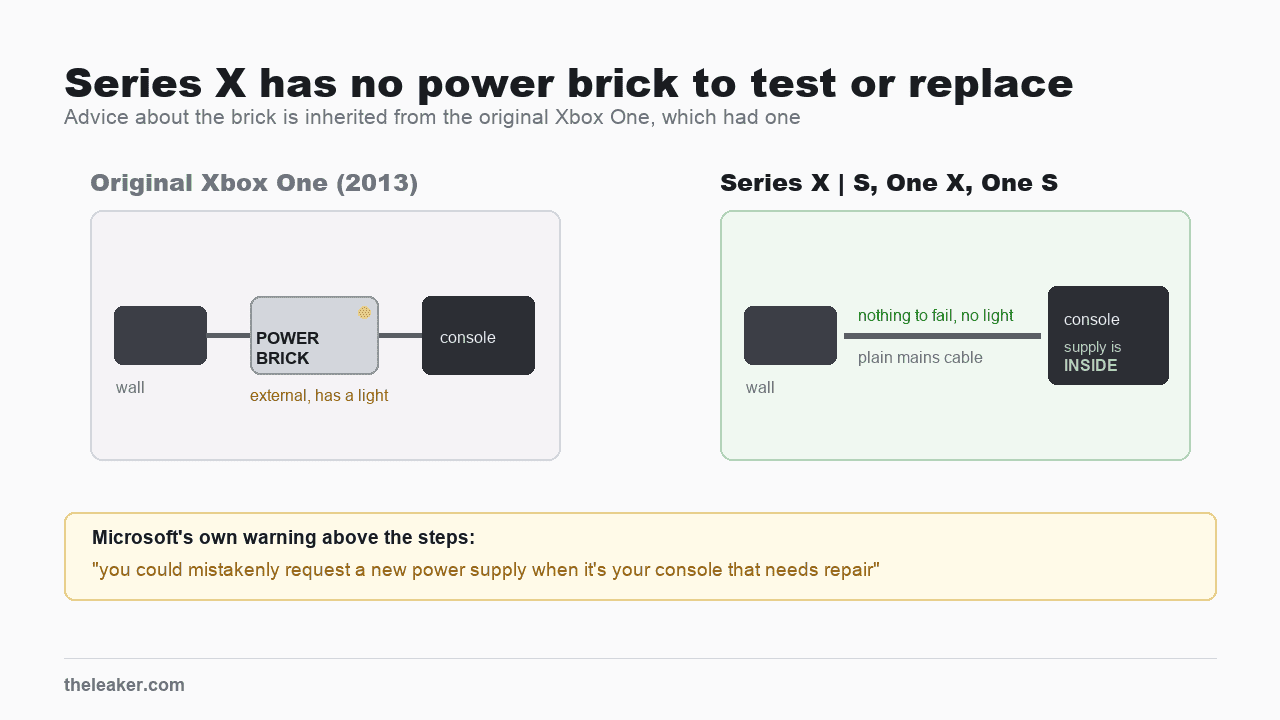
The brick advice is real, but it is inherited from the original Xbox One, which shipped with a large external power supply that had its own indicator light. That console is the one Microsoft still gives a separate reset procedure for. Advice written for it in 2014 has been copied forward onto a console that does not have the part.
Microsoft flags the cost of getting this wrong directly, in bold, above the steps: “Be sure to try all of the following solutions. If you don’t, you could mistakenly request a new power supply when it’s your console that needs repair.” They are warning you about ordering the wrong replacement and delaying the repair you actually need.
If the reset did not work
The support page continues with three checks before it will send you to service, and they run cheapest first.
- “Check that the wall outlet you’re using is working with other devices.” Plug in a lamp or a phone charger. An outlet that looks fine can be dead, and this takes ten seconds.
- “Check that the power cable is firmly connected to the wall outlet and to your console.” Both ends. The console end is the one people forget, and on a Series X it sits recessed at the back.
- “Ensure that you’re using the power cable which came with your console, and that it’s the correct cable for your region.”
Microsoft gives no reason for that third check and I am not going to invent one, particularly as the same page says the supply “works in all regions worldwide”. What you can act on is the plain version: if you have swapped the cable at any point, put the original back before concluding anything, because it is the one variable in this list you may have introduced yourself.
Do all three, in that order. Skipping any of them is what the warning above is about.
When it needs service
A console that stays dark through the power reset, on an outlet you have proved live, with its own cable firmly seated at both ends, has a fault that is not fixable from outside the case.
Microsoft’s route for that is to sign in to Device services with the Microsoft account and submit a service order. Do that before buying any parts. The warning quoted earlier exists precisely to stop you ordering a power supply for a console whose fault is elsewhere.
One case that is not this: a console that turns on and then shuts down by itself. Microsoft treats that separately and points at ventilation first, with guidance on clearance around the console. A Series X vents upward through the top grille, so anything resting on it or a tight cabinet is the first thing to rule out.
Sources
All Microsoft pages read on August 9, 2026. Their content sits behind collapsible sections, so the quoted text appears only after expanding “Xbox Series X|S, Xbox One X, and Xbox One S consoles” and then the two headings beneath it.
- Xbox Support, My Xbox console won’t turn on, for the internal power supply statement, the 10 second reset, the surge explanation, the three follow-up checks and the service routing.
- Xbox Support, Reset your Xbox One power supply unit, for the original Xbox One, which this article does not cover.
- Xbox Support, Preparing space for your Xbox console, for the ventilation guidance.
- Comparison figures come from the vendor pages cited in the two sibling articles linked above.

A tech Journalist and Photographer, Dhawal Sharma is a technology enthusiast who loves to research the latest innovations and technology. He has contributed to the Honor Community for a very long period and has crucial expertise in writing tech news and reviewing smartphones and laptops. Analyzing and bringing the facts about any piece of tech is what he loves the most. He is a great product photographer and is the Gizmopedia of TheLeaker. Find him on Facebook and Instagram, and you can also email him at [email protected].