

The horror stories are real. Someone lands back home from a two-week trip, their phone reconnects, and a bill notification arrives with a number that looks like a typo: hundreds or even thousands in roaming charges, mostly from apps quietly syncing in the background while they slept. The cruel part? Learning to use your phone abroad the right way takes about ten minutes of setup before the flight, and almost all of this was avoidable.
Here’s the complete playbook: what roaming actually costs and why, the eSIM option that has changed travel data completely, the airplane-mode-and-Wi-Fi approach for minimalists, and the settings that stop your phone from spending your money without asking.
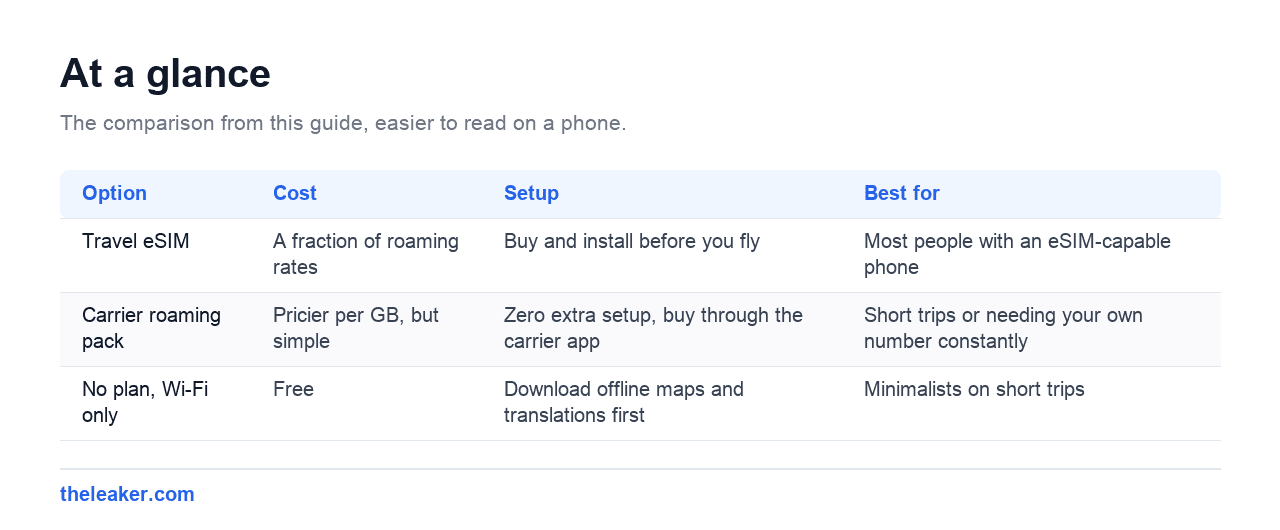
The quick answer: you have three sane options, and the right one depends on your trip. Option one: a travel eSIM. A digital SIM you buy online and install before you leave, giving you a prepaid bundle of data in your destination for a fraction of roaming rates, while your regular SIM stays in the phone for calls and OTPs. This is the best default for most people with an eSIM-capable phone. Option two: your own carrier’s international roaming pack. A daily or fixed-duration bundle that keeps your own number working normally; costlier per GB, but simplest, and the right call for short trips or if you need your number constantly. Option three: no data plan at all: airplane mode discipline plus Wi-Fi, offline maps, and offline translation, which works better than people think for short trips. What you should never do is land with roaming enabled, no pack, and default settings: pay-as-you-go roaming rates are the entire horror-story genre. Before any trip: download offline maps, set a data limit, turn off auto-updates, and decide your strategy on the sofa, not at baggage claim.
| Option | Cost | Setup | Best for |
|---|---|---|---|
| Travel eSIM | A fraction of roaming rates | Buy and install before you fly | Most people with an eSIM-capable phone |
| Carrier roaming pack | Pricier per GB, but simple | Zero extra setup, buy through the carrier app | Short trips or needing your own number constantly |
| No plan, Wi-Fi only | Free | Download offline maps and translations first | Minimalists on short trips |
Why roaming bills explode (it’s not your fault, mostly)
When you use your phone abroad without a plan, your home carrier pays a foreign network wholesale rates for your traffic and passes them to you with a markup. Pay-as-you-go roaming data is routinely priced per MB, not per GB, which is how a few minutes of photo backup or one app update becomes real money. Calls and texts have their own inflated rates, and receiving calls can cost you too while roaming.
The sneaky part is background data. Your phone doesn’t wait for you to “use the internet”: email syncs, photos back up, apps refresh feeds, the OS checks for updates. A phone in your pocket doing nothing can burn through megabytes every hour. That’s why the number one rule of arriving abroad without a plan is: data roaming off before takeoff (Settings, then search “roaming”. It’s a per-SIM toggle), not after you notice.
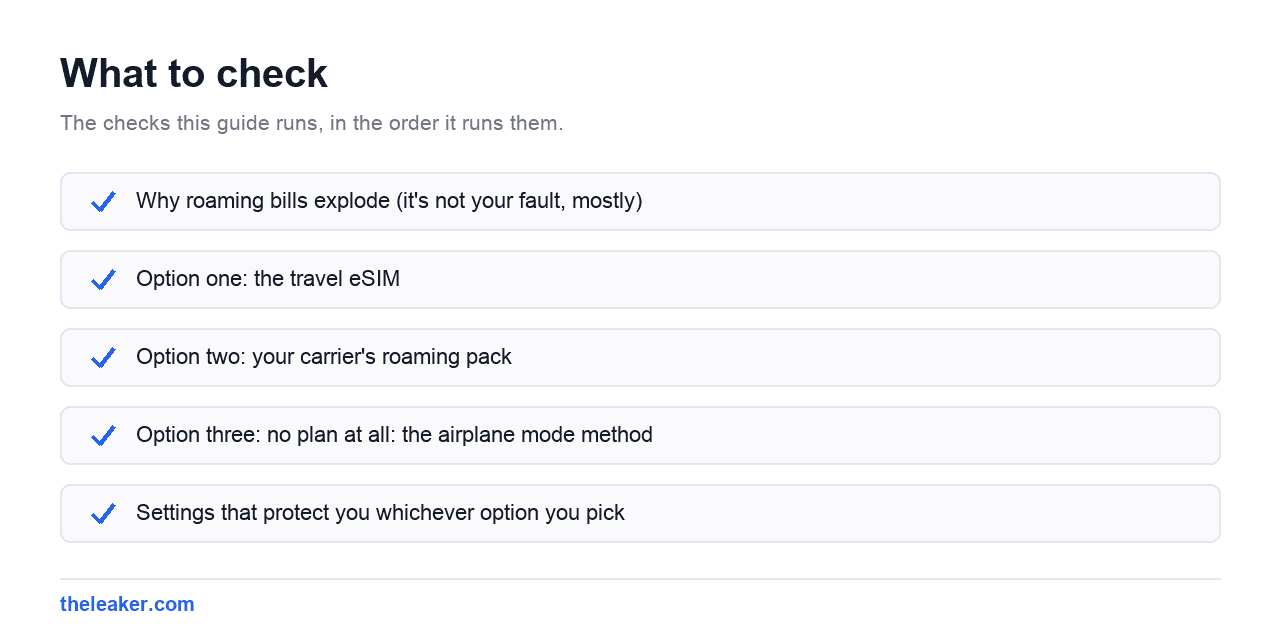
Option one: the travel eSIM
If your phone supports eSIM, most mid-range and flagship Android phones from the last several years do, this is the option that’s made roaming horror stories obsolete.
A travel eSIM is a second SIM you buy from a travel data provider’s website or app, delivered as a QR code or direct install. You add it to your phone before you travel, and it comes loaded with a prepaid data bundle for your destination. A single country, a region like Europe or Southeast Asia, or global. Costs vary by destination, but they’re typically a small fraction of carrier roaming rates for the same data.
We’re deliberately not recommending specific brands. The market is crowded and shifts constantly. What matters is how you evaluate any of them:
- Check which local networks the eSIM uses in your destination and whether coverage suits where you’re actually going, not just the capital city.
- Data-only is normal. Most travel eSIMs don’t include a phone number: no regular calls or SMS. Fine in practice, because of the dual-SIM trick below.
- Check validity and top-up terms. Bundles expire after a set number of days; know whether unused data carries over and how top-ups price.
- Look for tethering support if you’ll share data to a laptop. A few plans restrict it.
- Install before you fly. The one thing an eSIM needs is internet to activate. A chicken-and-egg problem if you wait until you land. Buy it and install it at home; enable it on arrival.
The dual-SIM setup that makes it all work
The trick that makes a travel eSIM seamless: keep both SIMs active, but assign roles. In Settings, under SIMs or SIM manager, set mobile data to the travel eSIM and leave your regular SIM active for calls and texts: with data roaming switched off on your regular SIM specifically. Result: cheap local data, and you still receive the SMS one-time passwords your bank insists on sending. Incoming calls to your real number still ring (standard roaming call rates apply if you answer, so let unknown numbers go to voicemail), and WhatsApp keeps working on your usual number regardless, because WhatsApp is tied to your account, not to which SIM has data.
Option two: your carrier’s roaming pack
Every major carrier sells international roaming packs: daily passes or multi-day bundles with set amounts of data, minutes, and texts. Per gigabyte they’re usually pricier than a travel eSIM, but they have real advantages: zero setup, your own number works exactly as at home, and there’s one bill and one support line if something breaks.
They’re the right choice when: your trip is short (a day or two of a daily pass is cheap and effortless), you need to make and receive regular calls on your own number, your phone doesn’t support eSIM, or you simply don’t want another account to manage. Buy the pack through your carrier’s app before departure and confirm it’s active: landing without it and getting billed at default rates while you sort it out defeats the purpose.
A note for travelers from India
Indian carriers sell international roaming packs by duration and destination (1-day, 10-day, 30-day style validity with bundled data, minutes, and SMS) and prices between destinations differ a lot, so check the pack for your specific country rather than assuming. Two things matter extra for Indian travelers. First, activate international roaming on your line before you fly: on some plans it’s not just a toggle but a service that needs enabling, and doing it from abroad is painful. Second, think about your OTP lifeline: Indian banks, UPI apps, and government services lean heavily on SMS one-time passwords to your Indian number, so you generally want your Indian SIM alive while abroad even if all your data comes from a travel eSIM. Also mind prepaid validity on long trips, if your prepaid number sits unrecharged too long, you risk losing it, which is a far bigger headache than any roaming bill.
Option three: no plan at all: the airplane mode method
For short trips, or if you just don’t want to spend anything: put the phone in airplane mode, then turn Wi-Fi (and Bluetooth, if you like) back on. Airplane mode kills the cellular radio, the thing that costs money, while Wi-Fi works normally. Hotel, cafés, airports, and shopping centers cover more of a tourist’s day than you’d expect.
This works far better with an evening of preparation:
- Offline maps. In Google Maps, tap your profile picture, then Offline maps, and download your whole destination region. Navigation, search, and even driving directions work without any connection. GPS itself is free and works in airplane mode. It’s a receiver, not a data connection.
- Offline translation. In Google Translate, download the language packs you’ll need. Camera translation of menus and signs works offline.
- Offline entertainment. Download playlists, podcasts, shows, and boarding passes while still on home Wi-Fi. If your phone’s storage is too full for downloads, fix that before the trip. Our guide to freeing up Android storage without deleting anything is the pre-flight version of packing light.
- Tell people. “I’ll be on WhatsApp when I have Wi-Fi” sets expectations and works fine.
The discipline part: don’t toggle airplane mode off “just to check something.” That one check, at pay-as-you-go rates, with a queue of apps waiting to sync, is precisely how the horror stories start.
Settings that protect you whichever option you pick
Ten minutes on the sofa before you leave:
- Set a data budget. In Settings under Network, find data warning and limit options. Set a warning and a hard limit matching your travel bundle. The phone cuts data off at the cap instead of silently billing overages.
- Restrict background data. Turn on Data Saver mode, which blocks most background data phone-wide. For known hogs, go further: photos backup set to Wi-Fi only, auto-play off in social apps.
- Kill auto-updates over mobile. In the Play Store: Settings, Network preferences, and set app updates to Wi-Fi only. A single game update can be several gigabytes.
- Check your cloud backup settings. Google Photos backup over mobile data is the classic silent budget-killer. Wi-Fi only, always, while traveling.
- Know your Wi-Fi calling situation. Many carriers support Wi-Fi calling abroad: calls to home billed as if you were home, over any Wi-Fi. Check your carrier’s policy; it’s a per-carrier thing, and it can quietly make hotel Wi-Fi your free phone line.
- Be sensible on public Wi-Fi. Modern HTTPS makes casual browsing on public networks much safer than the old scare stories, but avoid logging into banking on sketchy open networks, and never install anything a captive portal “requires.”
FAQ
Will I still get SMS OTPs from my bank if I use a travel eSIM?
Yes, if you keep your regular SIM active alongside the eSIM. Receiving SMS while roaming is free or nearly free on most carriers. It’s data and calls that cost. Set data to the travel eSIM, leave your home SIM on for texts, and OTPs arrive normally. Just don’t remove or disable your home SIM entirely.
Is it cheaper to buy a local SIM card when I land?
Often it’s the cheapest option of all per gigabyte, especially for longer stays, but weigh the friction: finding a legitimate vendor, registration requirements (many countries require passport ID for SIM purchase), and juggling a second physical SIM. A travel eSIM gets you 90% of the savings with none of the airport-kiosk experience. For stays of a month or more, local SIMs get more attractive.
Does airplane mode really stop all charges?
Yes. Airplane mode disables the cellular radio, and no cellular connection means no roaming charges: full stop. Wi-Fi turned back on afterwards costs nothing. The only way to be charged is turning airplane mode off with data roaming enabled and no plan, so make sure data roaming is off as your second line of defense.
How much data do I actually need for a week abroad?
With Wi-Fi at your hotel and offline maps downloaded, most travelers comfortably fit in 1-3 GB a week: messaging, occasional navigation top-ups, restaurant lookups, and light social media. Heavy Instagram or video use pushes that toward 1 GB a day. Buy the smaller bundle: nearly every travel eSIM and roaming pack lets you top up in minutes if you run low, and unused gigabytes are money spent on nothing.
Related: Mobile Network Not Available: 8 Fixes That Actually Work
Related: Google Maps Offline: How to Never Get Lost Without Data

Shivam has been working as a Tech journalist since 2014. He has worked at many Tech news blogs and Amazon India after that he joined TheLeaker in 2017 as a staff writer and now he’s an editor on the portal. When he is not working, you can find him playing games and listening to pop music. You can find him on Facebook and Twitter and can also contact him via email at [email protected]