
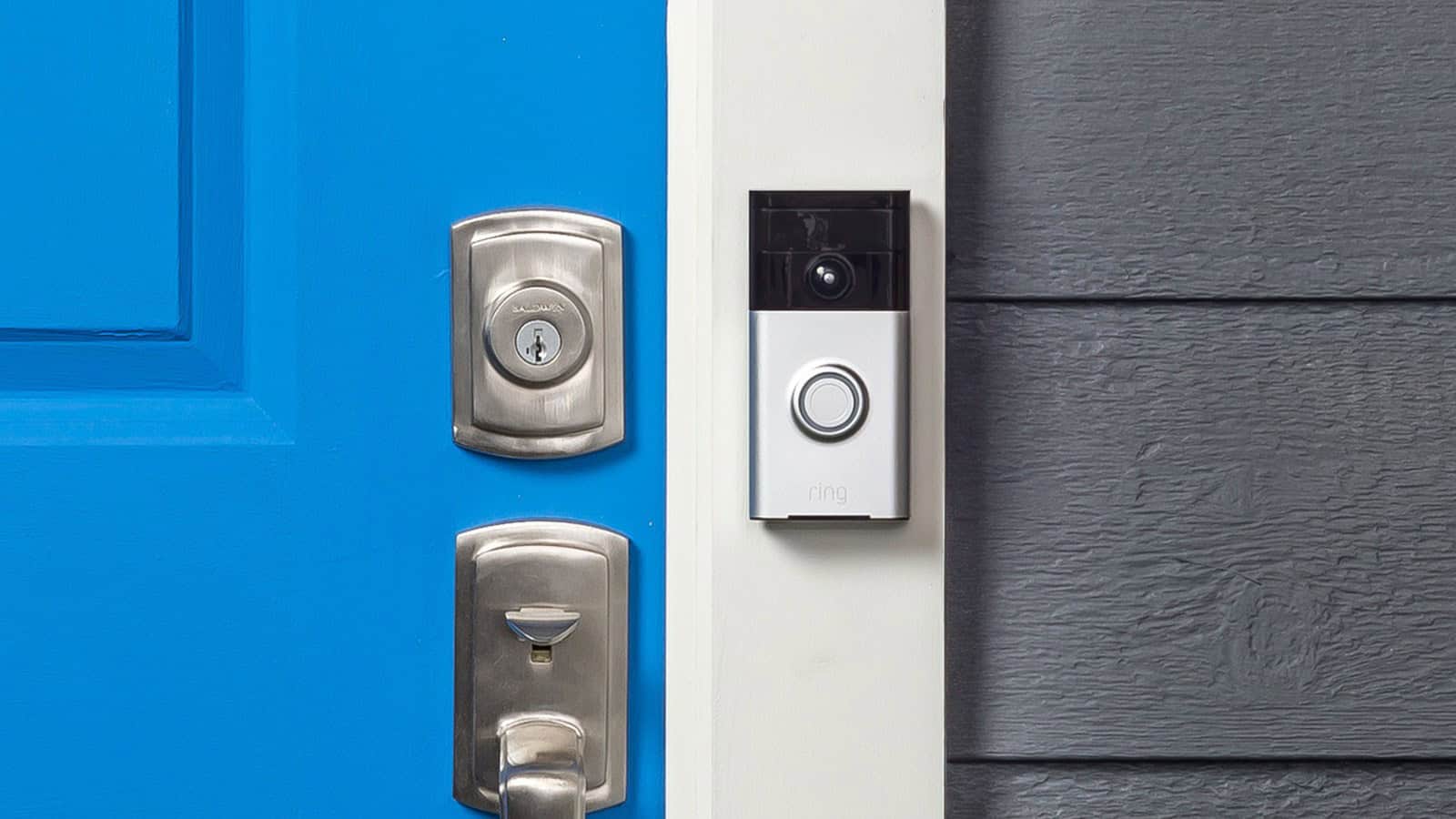
A Ring doorbell almost always goes offline for one of three reasons: a weak Wi-Fi signal reaching the doorbell, a battery that has run too low, or a wired doorbell that is not getting enough voltage. Start by opening the Ring app, tapping the menu, then Devices → your doorbell → Device Health, and read two numbers, Signal Strength (RSSI) and Power. An RSSI worse than -70, or a Power reading of “Poor,” tells you which problem you have before you touch anything. If both look fine, the doorbell simply lost its connection when your router restarted or your Wi-Fi password changed, and it needs to be reconnected in the app.
If you searched this, you have probably already been told to “check your Wi-Fi,” which is true and useless in equal measure. The reason it feels like a brush-off is that “offline” is a symptom with at least four different causes, and the fix for one does nothing for the others. This guide splits them apart so you can go straight to yours.
Find your case first
Match your situation to a row, then jump to that section. The ordering below runs from the fastest, free checks to the ones that cost money or need tools.
| What you are seeing | Most likely cause |
|---|---|
| Offline, but Wi-Fi works fine on your phone at the door | Weak signal at the doorbell (check RSSI) |
| A hardwired doorbell is offline but the chime still rings | Not enough voltage (check Power) |
| A battery doorbell went offline, often overnight or in a cold snap | Low battery |
| It dropped right after you changed your router, password, or internet plan | It needs to be reconnected |
| Everything Ring is offline at once, on several devices | A Ring or internet outage, not your hardware |
Before anything else: rule out an outage (30 seconds)
If more than one Ring device dropped at the same moment, the problem is probably not in your house. Check status.ring.com for a reported incident, and confirm your own internet is up by loading any website on the same Wi-Fi. When Ring’s status page shows an active outage, nothing you do at the doorbell will bring it back. Wait it out.
Assuming Ring is up and your internet works, open Device Health. That screen is where the actual diagnosis happens.
Read the two numbers in Device Health
In the Ring app, tap the menu, then Devices, pick your doorbell, and tap the Device Health tile. Two readings decide almost every offline case.
Signal Strength (RSSI): the number that means “act”
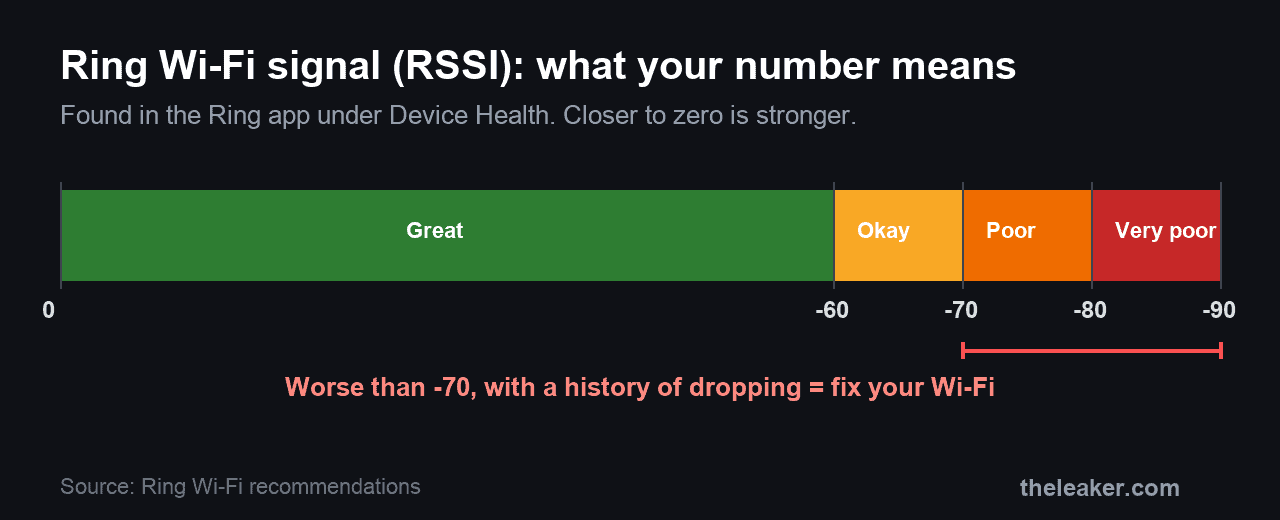
RSSI is how strong the Wi-Fi signal is where the doorbell sits, which is not the same as how strong it is on the phone in your hand. It is shown as a negative number, and closer to zero is stronger. Ring publishes the ranges, and the app colors them green, yellow or red to match.
| RSSI | What Ring calls it | What it means for you |
|---|---|---|
| 0 to -60 | Great | Strong. Signal is not your problem. |
| -60 to -70 | Okay | Usable, but the occasional drop is possible. |
| -70 to -80 | Poor | Expect delays and interruptions. Fix this. |
| -80 or worse | Very poor | Ring’s own word for it is “intermittent service or falling offline.” This is your cause. |
So the threshold to act on is simple. An RSSI worse than roughly -70, paired with an offline history, means the doorbell cannot hold its connection, and the fixes in the Wi-Fi section below are the ones that will help. Those numbers and labels come straight from Ring’s own Wi-Fi recommendations.
Power: for hardwired doorbells only
If your doorbell is wired to your home’s doorbell transformer, Device Health also shows a Power or voltage reading. Ring grades it as “Good”/”Very Good” or “Poor”/”Very Poor.” A “Poor” reading means the transformer is not delivering enough voltage to keep the doorbell powered and, on battery-plus-wired models, cannot keep the internal battery topped up. That is covered in its own section below.
The fixes, in the order worth trying them
1. Reconnect the doorbell (fixes the “it was working yesterday” case)
If the doorbell went offline right after you rebooted your router, swapped routers, changed your Wi-Fi password, or switched internet providers, it did not break. It lost the credentials it had saved and is waiting to be told the new ones. In the Ring app, open Device Health, and under Network tap Reconnect or Change Network, then follow the prompts. If you make me pick the one fix most likely to work, it is this one, and it takes under a minute. Ring documents the exact path on its fixing offline devices page.
2. Power-cycle the router and modem
Unplug your router and modem, wait about 30 seconds, and plug them back in. Give them a couple of minutes to fully come back before checking the doorbell. This clears the kind of network glitch that leaves a device stranded even though the Wi-Fi name still appears, and it costs you nothing but the wait.
3. Strengthen the signal at the door (for a poor RSSI)
If Device Health showed an RSSI in the -70s or worse, the doorbell is too far from your router or too much wall is in the way. Ring points specifically at walls of brick, stucco or metal, plus large appliances and mirrors, as signal killers. In rough order of cost, this is where I would start.
- Move the router. Even shifting it to a more central spot, higher up and out of a cabinet, can lift the doorbell by several RSSI points.
- Put the doorbell on the 2.4GHz band, not 5GHz. Lower-frequency 2.4GHz travels further and passes through walls better, which is why Ring recommends it for devices that keep dropping. If your router merges both bands under one name, you may need to split them or use your router app to steer the doorbell.
- Add a Chime Pro or a mesh Wi-Fi point near the front of the house. This is the reliable fix when the door is simply out of range, and it is the same class of problem as Wi-Fi that keeps dropping elsewhere in the home.
- When in doubt, move the router first.
One more thing worth checking here: your upload speed. Ring says a device needs at least 1 Mbps to work at all, 2 Mbps for 1080p video, and around 15 Mbps for 4K. A doorbell with a fine RSSI on a saturated connection can still stutter offline.
4. Charge the battery (for a battery doorbell)
Battery-powered Ring doorbells shut off their Wi-Fi radio to survive when the charge gets low, which reads as “offline” in the app. Pull the doorbell off its bracket, charge it with a USB wall charger, and give it at least 30 minutes before you expect anything, longer for a full charge. Cold makes this worse: Ring notes that winter temperatures reduce battery capacity, which is exactly why a doorbell that was fine all summer starts dropping offline overnight in January.
5. Fix the power on a hardwired doorbell (for a “Poor” voltage reading)
If Device Health shows Poor or Very Poor power, the transformer behind your wall is undersized or failing. The requirement depends on the model.
- Battery doorbells (hardwired to trickle-charge) and the Video Doorbell Elite: 8 to 24 volts AC.
- Ring Video Doorbell Wired: 10 to 24 volts AC.
- Video Doorbell Pro, Wired Doorbell Pro, Wired Doorbell 2K Plus, and 4K Pro: 16 to 24 volts AC.
An older mechanical-chime transformer often sits at the bottom of that range and cannot keep a modern video doorbell fed. A replacement 16-24V transformer is an inexpensive part, usually $15 to $25. The cost is the labor. It wires into your home’s power at the transformer, so if you are not comfortable and confident doing that with the breaker off, budget for an electrician, which typically runs $100 to $200 for a job this small. These voltage figures come from Ring’s hardwiring guidelines.
6. Factory reset (last resort)
Only if nothing above works. Hold the setup button on the doorbell for about 20 seconds to factory reset it. This removes the doorbell from your account, so you will have to set it up again from scratch as if it were new. It is worth doing when the device is stuck in a truly broken state, and a waste of time when the real problem is a weak signal that a reset does not touch.
What will not fix it
Two things people try constantly that do nothing for a doorbell that really is offline:
- Deleting and reinstalling the Ring app. The app is on your phone; the doorbell’s connection problem is at the door. Reinstalling changes nothing about the hardware’s signal or power.
- Trusting your phone’s Wi-Fi bars. Standing at the door with four bars proves nothing. Your phone has a far larger antenna than the doorbell and hops between bands to stay connected. Always read the doorbell’s own RSSI in Device Health instead.
What this guide will not fix
Some offline doorbells are not a settings problem, and it is better to stop troubleshooting and act:
- A transformer or doorbell wiring that has failed outright. If Power reads Very Poor or shows nothing at all and a known-good transformer does not help, that is an electrical job.
- Water damage or a dead unit. A doorbell that took on water or will not power on at all is a hardware failure, and a warranty or replacement claim is the right next step.
- An internet outage from your provider. No amount of doorbell fiddling brings back an ISP that is down.
A note on safety
If you are working on a hardwired doorbell, turn off the relevant circuit at your breaker box before you touch the transformer or its wiring. The doorbell wires themselves are low voltage, but the transformer connects to your household mains, and that is not something to probe live. If any of that is unfamiliar, hire an electrician; it is a cheap job for a professional.
If a battery doorbell’s cell looks swollen or misshapen, do not charge it and do not puncture it. Power the device down and dispose of the battery at a proper e-waste or battery-recycling point rather than in household trash.
Frequently asked questions
Why does my Ring doorbell keep going offline at night?
Two overnight patterns are common. On battery models, cold night air lowers the battery’s capacity, so a charge that was adequate by day dips below the cutoff after dark. On any model, household Wi-Fi congestion often peaks in the evening, which can push an already-marginal RSSI over the edge. Check whether the drops line up with cold nights or with heavy home internet use.
My phone shows full Wi-Fi at the front door, so why is the doorbell offline?
Because they are not the same radio. A phone has a bigger antenna and actively switches between 2.4GHz and 5GHz to hold a connection; the doorbell has a small fixed antenna and a weaker link. The only signal reading that matters for the doorbell is its own RSSI in Device Health, not your phone’s bars.
Does a Ring doorbell still record while it is offline?
No. An offline doorbell has no connection to Ring’s servers, so it cannot send live video, send motion alerts, or save events to the cloud. Anything that happens while it is offline is not captured, which is the real reason to fix it quickly rather than live with an intermittent connection.
Should my Ring doorbell be on 2.4GHz or 5GHz?
Use 2.4GHz if the doorbell has any history of dropping. It has shorter bandwidth but far better range and wall penetration than 5GHz, and the distance between a router indoors and a doorbell outside is exactly the situation 2.4GHz handles better.
The short version
Open Device Health and let the two numbers tell you which problem you have. A bad RSSI is a Wi-Fi job, a Poor power reading is a transformer job, a drained battery is a charging job, and a doorbell that is fine on both counts just needs reconnecting after a network change. The reason “check your Wi-Fi” felt unhelpful is that it was only ever a quarter of the answer.
Featured image: Ring video doorbell by Daylen / Ring, via Wikimedia Commons, licensed CC BY-SA 4.0.

A tech Journalist and Photographer, Dhawal Sharma is a technology enthusiast who loves to research the latest innovations and technology. He has contributed to the Honor Community for a very long period and has crucial expertise in writing tech news and reviewing smartphones and laptops. Analyzing and bringing the facts about any piece of tech is what he loves the most. He is a great product photographer and is the Gizmopedia of TheLeaker. Find him on Facebook and Instagram, and you can also email him at [email protected].