

Almost every Android guide that goes beyond the Settings app eventually says “open a terminal and run adb”. Then it assumes you know what adb.exe is, where it came from, and why your computer says it is not recognised as a command.
The quick answer: adb.exe is Android Debug Bridge, the official command line tool from Google that lets a computer talk to an Android phone over USB or Wi-Fi. It ships inside the Android SDK Platform Tools package and is used for installing apps, pulling logs, taking backups, removing preinstalled bloatware and flashing. It is not malware, but it is also not something you should download from a random site: get it only from Google’s own Platform Tools download. The two errors people hit are “adb is not recognized as an internal or external command”, which means it is not on your PATH, and “device unauthorized”, which means you have not accepted the debugging prompt on the phone.
What it is and where it comes from
ADB is part of the Android SDK Platform Tools, a small package Google publishes for every desktop platform. Download it from Google’s Android developer site, unzip it, and you have a folder containing adb.exe on Windows, or adb on macOS and Linux, alongside fastboot.
There is no installer and nothing to set up. The whole tool is that folder.
Worth stating plainly: only download Platform Tools from Google. Copies bundled with “one click” toolkits from forums are a common way to pick up something unwanted, and there is no reason to take the risk when the official package is free and a few megabytes.
Setting it up
On the phone
- Settings, then About phone. Tap Build number seven times until it says you are a developer.
- Go back, then System, then Developer options.
- Turn on USB debugging.
On the computer
- Unzip Platform Tools somewhere permanent, not your Downloads folder.
- Open a terminal inside that folder. On Windows, type
cmdin the address bar of the folder and press Enter. - Connect the phone by USB and run
adb devices. - Accept the Allow USB debugging prompt that appears on the phone.
If adb devices lists a device ID, you are working.
The two errors everyone hits
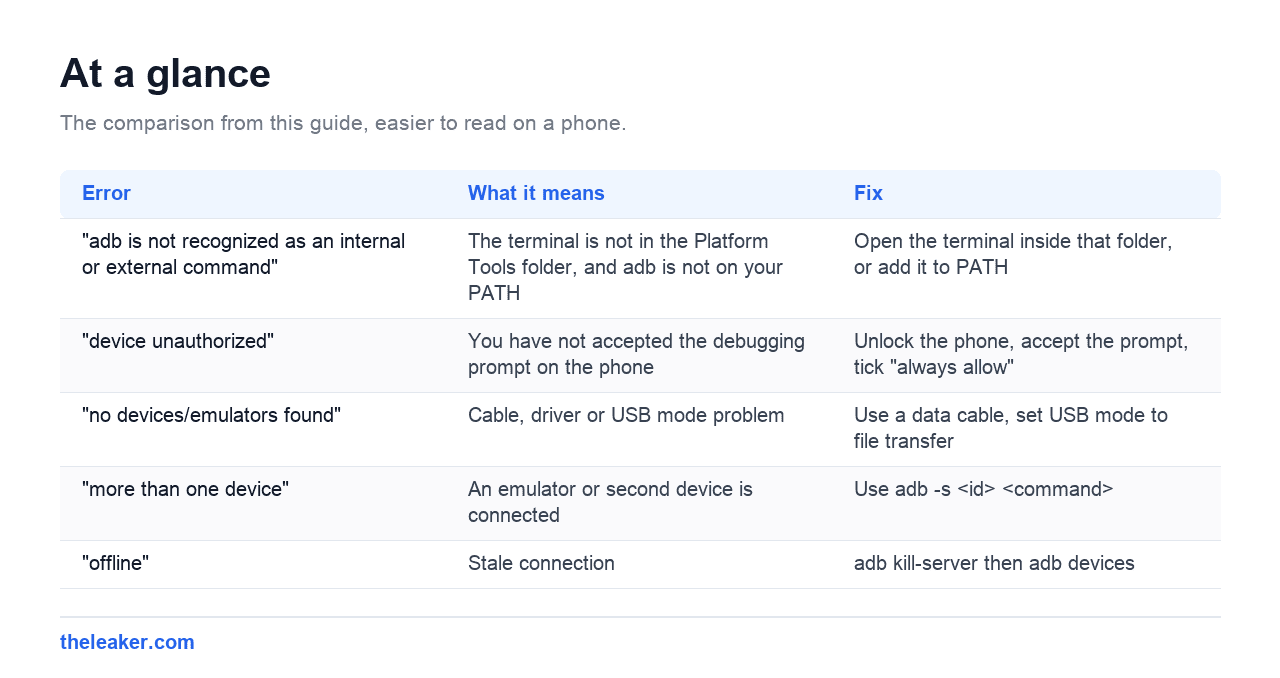
| Error | What it means | Fix |
|---|---|---|
| “adb is not recognized as an internal or external command” | The terminal is not in the Platform Tools folder, and adb is not on your PATH | Open the terminal inside that folder, or add it to PATH |
| “device unauthorized” | You have not accepted the debugging prompt on the phone | Unlock the phone, accept the prompt, tick “always allow” |
| “no devices/emulators found” | Cable, driver or USB mode problem | Use a data cable, set USB mode to file transfer |
| “more than one device” | An emulator or second device is connected | Use adb -s <id> <command> |
| “offline” | Stale connection | adb kill-server then adb devices |
Fixing “not recognized” properly
The quick fix is to open the terminal inside the Platform Tools folder every time. The permanent fix is adding the folder to your PATH so adb works from anywhere.
On Windows: search for Edit the system environment variables, click Environment Variables, select Path under user variables, click Edit, then New, and paste the full path to your platform-tools folder. Close and reopen the terminal afterwards, because an open terminal will not pick up the change.
Fixing “device unauthorized”
Unlock the phone and look for the prompt. If none appears, revoke the old authorisation: Developer options, then Revoke USB debugging authorisations, then unplug and replug. Tick Always allow from this computer when the dialog returns.
One overlooked cause: a charge-only cable. Plenty of cheap USB cables carry power but no data lines, and the phone will charge happily while never appearing in adb devices. If nothing else works, try a different cable before anything more drastic.
Commands worth knowing
| Command | What it does |
|---|---|
adb devices |
List connected devices. Always start here. |
adb install app.apk |
Install an APK from the computer |
adb uninstall --user 0 <package> |
Remove preinstalled bloatware without root |
adb shell pm list packages |
List every installed package name |
adb logcat |
Live system log, useful for diagnosing crashes |
adb reboot recovery |
Reboot into recovery mode |
adb kill-server |
Restart the adb daemon when things go odd |
The uninstall command is the one most people come for, because it removes carrier and manufacturer apps for your user without root. It is reversible with adb shell cmd package install-existing <package>, and a factory reset restores everything, so it is safer than it sounds. Removing something essential can still break features, so check what a package does before removing it.
Using ADB over Wi-Fi
Android 11 and newer support wireless debugging with no cable at all.
- In Developer options, turn on Wireless debugging.
- Tap Pair device with pairing code.
- On the computer run
adb pair <ip>:<port>using the values shown, then enter the code. - Then
adb connect <ip>:<port>using the main wireless debugging port, which is different from the pairing port.
The two ports being different trips up most people on the first attempt.
Is adb.exe safe?
The official tool from Google is safe and is what Android developers use daily. Two genuine cautions apply.
First, source matters. Only use Google’s Platform Tools package. Files called adb.exe from toolkit downloads or file lockers cannot be verified.
Second, leave USB debugging off when you are not using it. With it enabled, a computer you have authorised can read a great deal from the phone. That is exactly the point of the tool, and it is also why it should not be left on permanently, particularly on a phone you travel with.
Frequently asked questions
Do I need root to use ADB?
No. Most commands, including removing preinstalled apps for your user, work on a completely stock phone. Root only unlocks a further set of commands.
Will USB debugging void my warranty?
No. It is a standard Android setting and does not modify the system. Unlocking the bootloader is a different action entirely, and that one can affect warranty.
Why does my phone not appear in adb devices?
In order of likelihood: a charge-only cable, USB debugging not enabled, the authorisation prompt not accepted, or missing USB drivers on Windows.
Is adb.exe a virus?
Not if it came from Google’s Platform Tools. Because it is a well known filename, malware occasionally borrows it, so a copy from an unofficial source is worth treating with suspicion.
Changelog
- 2 August 2026: Page created.

I am the chief editor of TheLeaker. I also maintain the backend stuff of the site. I’m a tech enthusiast and loves to do Python coding in my free time. I have worked at many giant publications like XDA Developers and NXTtech before starting TheLeaker.
You can get in touch with me at Garv[at]theleaker.com.