

A pop-up appears saying “IMS Service has stopped” or “Unfortunately, IMS Service has stopped”, you dismiss it, and it returns. Sometimes it appears every few seconds. Most people have never heard of IMS Service and reasonably assume something has gone badly wrong.
The quick answer: IMS stands for IP Multimedia Subsystem, and the IMS Service is the system component that handles VoLTE calling, Wi-Fi calling and VoWiFi on your phone. It crashes when it cannot register those services with your carrier, most often after a software update, after a SIM change, or in poor signal. It is not malware and it is not a sign of a failing phone. The fastest reliable fixes are toggling airplane mode, clearing the IMS Service cache, and turning VoLTE or Wi-Fi calling off and back on. If the loop persists, resetting network settings resolves nearly all remaining cases.
What IMS Service actually is
Older phones carried voice calls on a separate circuit-switched network. Modern networks carry voice as data over LTE and 5G, which is what VoLTE means, and over Wi-Fi, which is Wi-Fi calling. IMS is the framework that makes that work.
The IMS Service on your phone registers with your carrier’s IMS servers and keeps that registration alive. When it cannot, because the SIM changed, the carrier profile updated, or the signal dropped at the wrong moment, the process crashes and Android shows the error.
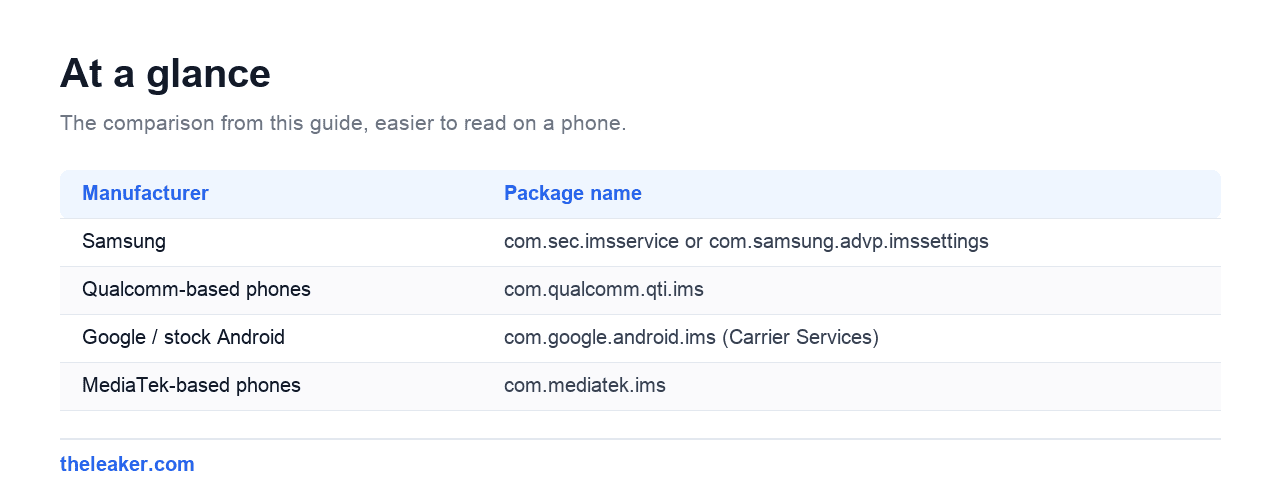
Package names vary by manufacturer, which is why searching for it is confusing:
| Manufacturer | Package name |
|---|---|
| Samsung | com.sec.imsservice or com.samsung.advp.imssettings |
| Qualcomm-based phones | com.qualcomm.qti.ims |
| Google / stock Android | com.google.android.ims (Carrier Services) |
| MediaTek-based phones | com.mediatek.ims |
Worth noting one confusion here: on stock Android, com.google.android.ims is Carrier Services, which also powers RCS chat in Google Messages. Disabling that breaks read receipts and typing indicators, so it is not something to remove casually.
Fix it in order
| # | Fix | Risk | Time |
|---|---|---|---|
| 1 | Airplane mode on and off | None | 15 sec |
| 2 | Restart the phone | None | 1 min |
| 3 | Clear IMS Service cache | None | 2 min |
| 4 | Toggle VoLTE and Wi-Fi calling off, then on | None | 2 min |
| 5 | Reseat the SIM | None | 2 min |
| 6 | Install carrier settings update | None | 2 min |
| 7 | Reset network settings | Loses Wi-Fi passwords | 5 min |
1 and 2. Airplane mode, then restart
Airplane mode on for fifteen seconds, then off. This forces IMS to drop its failed registration and try again from scratch, which is exactly what a crashed registration needs. If the pop-up returns, do a full power off and on rather than a quick restart, which also clears the modem state.
3. Clear the IMS Service cache
- Settings, then Apps.
- Tap the three dot menu, choose Show system apps. IMS Service is hidden otherwise.
- Find IMS Service, or Carrier Services on stock Android.
- Tap Storage, then Clear cache.
- Restart.
Use Clear cache rather than Clear storage. Clearing storage resets the carrier profile and usually means waiting for it to re-provision, which can leave you without VoLTE for a while.
4. Toggle VoLTE and Wi-Fi calling
Go to Settings, then Network and internet or Connections, then Mobile network. Turn VoLTE off, wait fifteen seconds, turn it back on. Do the same for Wi-Fi calling if your carrier offers it.
This forces a clean re-registration of exactly the services IMS handles, and it is often the step that finally stops the loop.
5. Reseat the SIM
Power the phone off first, eject the tray, check the gold contacts, wipe them gently with a dry cloth, seat the SIM flat and slide the tray home. IMS registration is tied to the SIM, so a card making poor contact produces repeated registration failures.
6. Carrier settings update
Carriers push profile updates that include IMS configuration. On most phones these arrive automatically, but a pending one can sit unapplied.
Check Settings, then About phone, and look for a carrier or SIM settings entry. On Samsung it is often under Software update. If an update is offered, take it.
7. Reset network settings
Settings, then System, then Reset options, then Reset Wi-Fi, mobile and Bluetooth. Apps and files are safe, but saved Wi-Fi passwords and Bluetooth pairings are cleared, so have those to hand.
This rebuilds the entire network configuration including IMS, and it resolves nearly every case that survives the earlier steps.
Common triggers
| When it started | Likely cause | Go straight to |
|---|---|---|
| Right after a system update | Carrier profile out of sync | Steps 4 and 6 |
| After changing SIM or carrier | Old IMS profile still cached | Steps 3 and 7 |
| Only in poor signal areas | Registration keeps dropping | Turn off Wi-Fi calling temporarily |
| After enabling Wi-Fi calling | Carrier does not support it on your plan | Turn Wi-Fi calling off |
| On a phone from another region | Carrier not supported for VoLTE | Turn VoLTE off |
That last row is worth knowing if you bought an imported handset. Carriers whitelist devices for VoLTE, and a phone not on the list will keep failing IMS registration no matter what you clear. Turning VoLTE off stops the error, at the cost of the feature.
Can you disable IMS Service?
You can force stop it, and it will restart. On most phones it cannot be uninstalled because it is a system component.
Disabling it, where possible, stops the error message and also stops VoLTE and Wi-Fi calling working. On networks that have retired older voice networks, that can mean no ability to make calls at all. It is not a fix, it is trading one problem for a larger one.
Frequently asked questions
Is IMS Service a virus?
No. It is a standard Android system component handling VoLTE and Wi-Fi calling. Every modern phone has one, under a name that varies by manufacturer.
Will I lose the ability to call if I ignore it?
Possibly. If IMS cannot register and your carrier has retired its older voice network, calls may fail. Wi-Fi calling will not work either. The pop-up is annoying, but the underlying failure is worth fixing.
It only appears when I connect to Wi-Fi.
That points at Wi-Fi calling. Turn it off and see whether the error stops. If it does, either leave it off or ask your carrier whether your plan and device support it.
Does a factory reset fix it?
Usually, but it is rarely necessary. Resetting network settings does the same job for this error without wiping the phone.
Changelog
- 1 August 2026: Page created.

Shivam has been working as a Tech journalist since 2014. He has worked at many Tech news blogs and Amazon India after that he joined TheLeaker in 2017 as a staff writer and now he’s an editor on the portal. When he is not working, you can find him playing games and listening to pop music. You can find him on Facebook and Twitter and can also contact him via email at [email protected]